跨境独立站开店
2021 update archive | Tools and apps | Shopify API Release: July Edition
A summary of API features as of July 2021. This information will help you improve the quality of your app and streamline your development experience by incorporating the latest changes.

Build an app for Shopify merchants
Whether you need app development for the Shopify App Store, custom app development services, or to drive user base growth, the Shopify Partner Program supports your success. Sign up for free and access educational resources, a developer preview environment, and a recurring revenue sharing program.
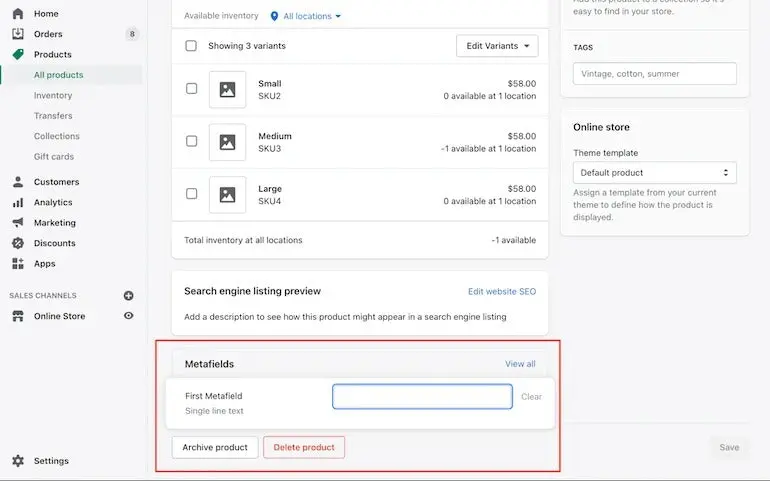
1. Metafield update
Until this version was released, it was possible to use meta fields in the storefront, but it was a time-consuming and inflexible process. The only usable meta fields in the storefront were product and product variation resources, and it was necessary to create the meta fields via the API and hardcode them into the theme.
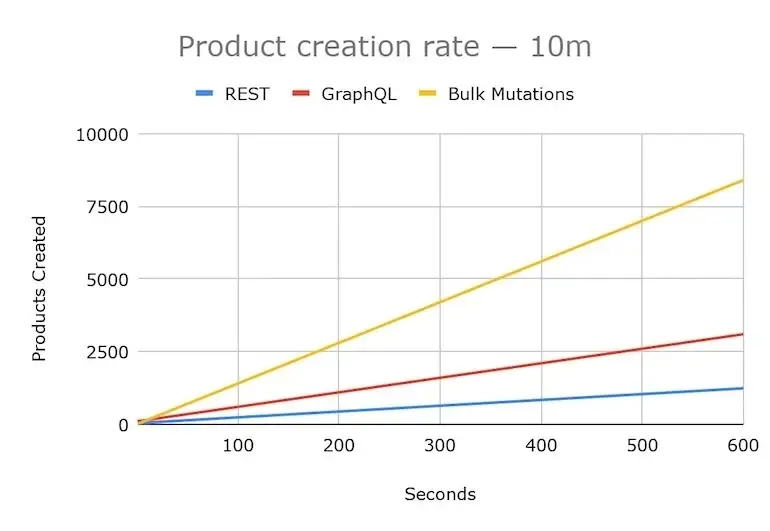
2. Bulk Mutation API
Last year, we released a Bulk API that allowed apps to manage large datasets without completely straining call limits when retrieving data. In this version, we're releasing a new related feature that significantly improves how you handle data from large stores: the Bulk Mutation API. The Bulk Mutation API eliminates the need to manage client-side throttling and allows apps to perform mutations asynchronously to import large amounts of data from your Shopify store.
3. Product Variant Bulk API
There have been some pitfalls to be aware of when manipulating variations using the Product resource. Traditionally, it was necessary to infer the intent of the API client based on the difference between the state of the Shopify product and the client's request. Shopify assumes that calls to the Product API that include variations have a copy of the latest variation data. In previous API versions, the most common mistake when using the Product API was the unintentional deletion of variations by pushing outdated product data.