跨境独立站开店
How to Choose a Shopify App and Check Its Permissions, Speed and Cost
Before installing an app, record the problem, the existing alternatives, the expected result and the full cost. The same checklist helps you decide when to remove it.
Determine if installation is required
First, write down the problem you hope to solve in one sentence, such as "Visitors cannot filter sizes." Search for the same capability in theme settings, existing applications, and the backend. Identify the users, the metrics you want to improve, and the current baseline. If no one can explain where the improvement should be implemented, postpone the installation.
Prioritize according to store stage
For new stores, prioritize addressing tasks impacting order taking and fulfillment, such as logistics notifications, order processing, and after-sales contact information. Conversion tools require comparable results; review components, recommended products, or subscription pop-ups should each have clearly defined objectives. Page design, search, and filtering tools must be validated against the existing theme; having two search applications simultaneously managing a single input field makes it difficult to pinpoint the source of problems during subsequent maintenance.
Verification of permissions for the comparison function
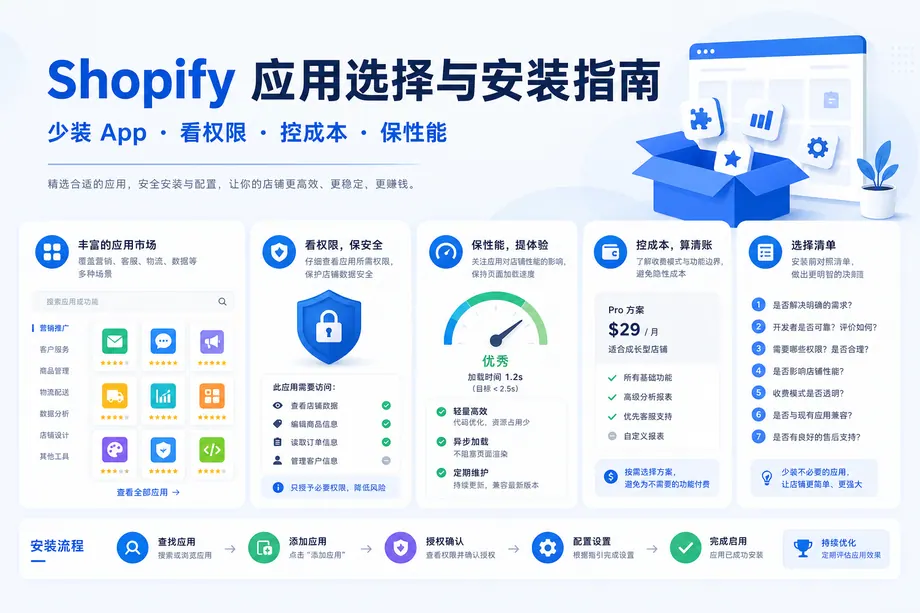
Open the application documentation and view the developer, maintenance, and support information. The installation license page will list the required data and their scope of operation. Order fulfillment applications have a clear purpose in reading orders; components that only display size suggestions but require a large number of orders and customer information should have their specific purpose inquired before deciding whether to grant permission. Record the authorizing person and the approval date.
Speed measured on the same set of pages
Before installation, record the display and interaction of the homepage, list pages, and product pages on your phone, then retest the same pages. Pay close attention to the initial image, first input, purchase button, and menu for any delays. Also, note any new scripts, styles, and third-party requests. Some application settings affect the entire store; copying the theme individually may not isolate all impacts. Understand the scope of effect before installation.
List the actual costs
Check whether charges are based on orders, contacts, visits, or emails in addition to the monthly fee. Record the trial end date, the estimated cost after reaching the next tier, and whether payment will be made through Shopify billing or a separate contract. Estimate the cost using current business volume and a peak promotional period to avoid seeing additional expenses only after traffic growth.
Installation, commissioning and withdrawal
- Retain baselines, existing theme copies, and affected pages; enable only the features needed for this specific installation after installation.
- Perform a task test once on the desktop and once on the mobile phone, and record the target metrics, feedback, and costs.
- Before discontinuing use, confirm whether historical data needs to be exported, and close processes and embeddings that depend on the application. After uninstallation, review the billing; stand-alone paid services will be handled according to the original agreement.
- Reopen the original test page and check for any residual modules or layout misalignments. Back up any code snippets from the old theme and verify their source before proceeding.
Monthly review
In the same table, record the responsible person, last usage date, monthly expenses, required permissions, and results for each application. Continue using applications that are still needed for business operations, are properly maintained, and generate clear benefits; clean up applications with duplicate functions or those that are unused according to the exit procedure. Leave the conclusions to the colleagues who will be revising the theme or changing personnel next time.