跨境独立站开店
What is Shopify? A summary of its features and services.
Shopify is an e-commerce platform that makes it easy to create an online store. This article summarizes what Shopify is, what services it offers, and what features are available in a Shopify store.



This article introduces the basic functions and services of Shopify, which allows you to easily set up an online store.
Shopify is a subscription-based (monthly fee) e-commerce platform that makes it easy to set up an online store. Shopify also offers Shopify POS, a point-of-sale (POS) service that supports sales management in physical stores.
Here, we'll introduce what Shopify is, its features, and services.
If you'd like to learn more about the different types and features of e-commerce platforms, including Shopify, please also refer to our "Complete Guide to E-commerce Platforms."
What is an e-commerce platform? | A thorough explanation of types, how to choose one, and major services.
What is Shopify?
Shopify is an e-commerce platform that makes it easy to open an online store. Even users without web development knowledge can easily create an online store thanks to Shopify's packaged subscription service, which includes e-commerce site templates, payment methods, and hosting services.
Shopify is a Canadian company that is used in over 175 countries outside of Japan, with millions of online stores created using Shopify. In addition to online sales, Shopify also offers the Shopify POS service, which supports brick-and-mortar stores.
If you'd like to compare services other than Shopify, please refer to our "Recommended E-commerce Site Comparison" guide.
Recommended E-commerce Site Guide | How to Choose Based on Purpose and Scale, and Comparison of Major Platforms
Shopify Basic Features
Here are the details of the basic features included in all Shopify plans. These basic features include everything you need for a typical e-commerce site.
Store function
- Shopify's online store platform offers a complete solution for e-commerce, including website creation, hosting (uploading information to a server and making the site viewable), and payment processing. Even without design or website creation knowledge, you can easily create an online store using the provided template themes. You can find a shop theme that suits your business model in the Shopify Theme Store and customize it to enable product sales, blog post uploads, and new page creation. You can also choose from 33 recommended themes categorized by industry. Using a theme means Shopify handles security and updates, allowing you to focus on managing your store without worrying about site maintenance. Since you don't need to contract a separate hosting service, you can quickly open your online store.
- Shopify POS Lite is a point-of-sale (POS) system provided by Shopify. Regardless of your Shopify plan, you can use Shopify POS Lite for free. It can be used not only for online store product management and sales data analysis, but also for in-store payments. To start using it, simply install the POS channel from your Shopify admin panel and then install the POS app on your smartphone or tablet.
- Shopify Payments allows you to start accepting payments immediately after registration by simply activating it from the admin panel. Shopify supports a variety of payment methods, from credit cards such as Visa and MasterCard to Apple Pay and PayPal.
- Shopify Checkout can be used not only for sales on your own store, but also for sales on social media platforms like Instagram and e-commerce marketplaces. It's constantly optimized for speed and conversion, ensuring a smooth checkout process.
Shipping partners (not available in Japan)
While not yet available in Japan, you can customize your shipping settings to suit your business needs. In areas where Shopify's shipping features are available, you can also use services such as tracking and discounts. In addition, you can set up options such as curbside pickup, where customers can pick up their online orders in the store's parking lot, and local delivery.
Back office
- The Shopify mobile app allows you to manage orders from your smartphone or tablet. You can use a barcode scanner to take orders and check inventory, and you can perform the same tasks as on your computer from your smartphone or tablet, so you can track sales and place orders while on the go.
- Analytics and Reporting: You can view store activity in real time, such as the number of visitors to your online shop and sales. Data analysis features are also available, allowing you to analyze data such as traffic acquisition reports, behavioral reports, and the keywords visitors used to search for products.
- The Shopify App Store offers a variety of extensions, allowing you to add features that suit your online store or business model. These include apps for easily customizing product pages, language translation apps, shipping label creation apps, and even subscription apps.
- Support is available in Japanese, providing peace of mind in case of any issues, as well as the Shopify community forum.
marketing
If you want to compare major e-commerce services, we also recommend checking out our "EC Site Ranking" service.
EC Site Ranking 2026 | Thorough Comparison of Sales, Number of Users, and Platforms
Shopify optional services
Below is a summary of recommended optional services for Shopify website owners. Shopify offers not only features available immediately after signing up for a plan, but also a variety of free and paid optional services.
Most features, from sales and shipping to marketing and operations, can be easily enabled with a single click from the Shopify admin panel. Adding or removing features to match your business changes is simple, and you can even opt for a one-time service.
Shop Pay
Shop Pay is a fast payment method available on Shopify. By saving your email address, credit card information, shipping address, and billing information, you can quickly make payments on subsequent purchases. You can also use the Express Checkout button, which allows you to purchase items immediately without adding them to your cart.
Marketplace Connect
Marketplace Connect is an app that allows you to promote and sell items you sell on Shopify on other marketplaces and social media. It allows you to sync with e-commerce platforms like Amazon, eBay, and Etsy to increase your sales opportunities. With Marketplace Connect, you can sync your product catalog with online marketplaces and manage inventory, orders, and performance from your Shopify site.
Updated Markets
Managed Markets is recommended for those selling products internationally. Cross-border e-commerce involves complexities such as shipping, customs duties, and product restrictions imposed by each destination country. Managed Markets simplifies these international ordering procedures.
Shopify Collabs
Shopify Collabs is a free app that lets you invite and manage collaborations with influencers and creators. Besides sending direct invitations, you can also search for creators using the Collabs network and send them offers. You can also send gifts and coupon codes, track affiliate sales, and manage affiliate payments.
Shopify Mail
Shopify Mail is Shopify's proprietary email marketing tool. You can choose from a variety of email templates to suit your business and run campaigns to further increase sales. You can track the effectiveness of your emails in the same place where you manage product and customer information, allowing you to see how much each email contributed to sales.
Shopify Inbox
Shopify Inbox is a free messaging app that allows you to smoothly respond to customer inquiries through chat. To drive sales, you can use automated message filtering to identify conversations with a high probability of leading to sales, and even offer unique coupon codes in chat to boost sales. It also features automated messaging, such as suggesting the most relevant answers from a pre-defined list of frequently asked questions.
Shopify POS
If you have a permanent physical store, Shopify POS is a convenient solution. It offers features such as order processing, receiving records, inventory tracking, inventory analysis, and sales item suggestions, helping to prevent errors and increase revenue. Additionally, you can create unlimited store staff accounts and categorize sales by staff member. POS Go allows you to handle everything from barcode scanning to contactless payments in a single device within your retail store.
If you want to launch your own e-commerce site with Shopify, the "In-House E-commerce Site Construction Guide" explains the process in detail.
The Complete Guide to Building Your Own E-commerce Site | A Thorough Explanation of Differences, Benefits, and How to Proceed Compared to Marketplace Stores
Shopify app
The Shopify App Store lets you add the features and themes you need for your shop from over 8,000 apps. You can add a variety of functions, from shop design to marketing, shipping, and social media advertising tools, maximizing your business opportunities.
Furthermore, only apps that meet 100 review criteria are available on the Shopify App Store, so you can use them with confidence. A problem-based classification system and powerful search functionality make it easy to find the apps you need.
If you're considering hiring a web development company to build your Shopify website, the "EC Site Development Company Guide" may be a helpful resource.
How to Choose an E-commerce Website Development Company: A Thorough Explanation of Pricing, Comparisons by Type, and the Process of Requesting Services
Customizable with custom code
Shopify is a platform that can be customized even without web development knowledge, but if you have programming or coding knowledge, you can also perform detailed customizations.
For those who want to customize their shop's design and functionality, the following options are available:
- Customize an existing theme
- Create your own custom theme
- Create a custom app for your own store using development tools and the Shopify API.
Shopify also has a programming language called Liquid, and it comes with many templates and examples.
The features of the SaaS-based e-commerce platform used by Shopify are explained in detail in the "E-commerce Site ASP/SaaS Guide".
Complete Guide to E-commerce ASPs | Thorough Explanation of Differences from SaaS, Pricing, and How to Choose
Let's get started with Shopify
Shopify is an all-in-one e-commerce platform. Not only can you run your shop using existing themes, but you can also add apps to suit your needs, and even commission experts to develop custom themes and apps for you. Shopify adapts to a variety of needs, and setting up your online store is simple. Find the customization method that suits your shop and lead your business to success.
Also, since there are various other platforms for online shops, please refer to comparisons between Shopify and other online shop platforms as well.
- Find products that will sell in your shop! 12 apps to help you find products you don't need to ship yourself.
- Checklist for setting up a Shopify store
- An overview of Shopify's template language, Liquid.
- This guide will show you how to create a B2B wholesale store using Shopify!
- Surprisingly easy!? 14 ways to sell your first products online
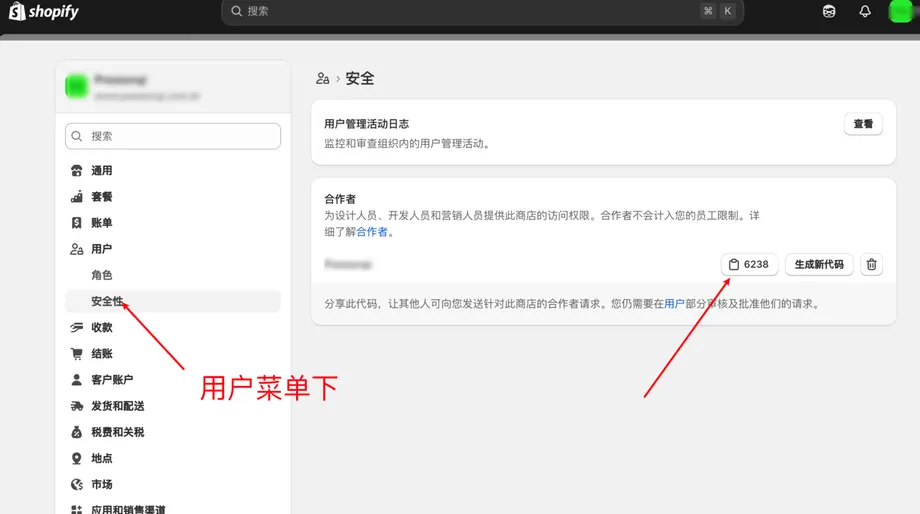
- What is a Shopify collaborator account?
- We exhibited at RetailTech JAPAN 2018!
- For the first time ever, Shopify Unite was held in Japan!
If you'd like to learn more about shopping cart systems needed for e-commerce sites, please also see our "Complete Guide to Shopping Cart Systems."
The Complete Guide to Shopping Cart Systems: Types, Pricing, How to Choose, and Recommended Services
FAQ
What is Shopify?
Shopify is a subscription-based service that allows anyone to quickly start an online store and sell products. Shopify store owners can sell not only online but also in physical stores using Shopify POS.
When was Shopify founded? When did it enter the Japanese market?
Shopify was founded in 2006. It entered the Japanese market in 2017.
What can I sell on Shopify?
In addition to physical goods, Shopify allows you to sell food, downloadable products, memberships (such as subscriptions and online yoga studios), ticket-based experiences, courses, and lessons.
How do you pronounce Shopify?
In katakana, it's written as "Shoppifai". When written in English, it's "Shopify," with the first "S" capitalized.
What are the costs involved in setting up an online store with Shopify?
Shopify offers three plans, allowing you to choose one that best suits your business model and budget. Additional costs may apply when adding options or apps.
Additionally, acquiring and using a custom domain name incurs initial setup fees and renewal fees.
If you are considering migrating from your existing e-commerce site to Shopify, the "E-commerce Site Replacement Guide" may also be helpful.
The Complete Guide to E-commerce Renewal: Thorough Explanation of Decision Signs, Process, Costs, and ROI
Share this article
- Share on Facebook
- Share on X
- Share on LinkedIn