跨境独立站开店
How to create a members-only website with Shopify
"You can read this in 1 minute." With Shopify, you can easily create a completely members-only e-commerce site where only members can view and shop. This article will show you how to redirect users to the registration page when they access your site, so that the front end of your site becomes a registration/login form.

Shopify makes it easy to create a fully members-only e-commerce site where only members can browse and shop. This guide will show you how to redirect users to a registration/login page when they access your site, so that the front end of your site becomes a registration/login form.
Shopify makes it easy to create a fully members-only e-commerce site where only members can view and shop.
This guide explains how to redirect users to a registration/login page when they access your website, so that the front-end of your site becomes a user registration/login form.
*This process involves modifying code related to the store's display and functionality, so please proceed at your own risk. It is also recommended to save the code in a separate file before making any changes.
If you would like to add member-only features, please also refer to the "EC Site Customization Guide".
Complete Guide to Customizing Your E-commerce Site: Thorough Explanation of Cost Estimates, Unique Features, and Scalability
1. Activate your customer account.
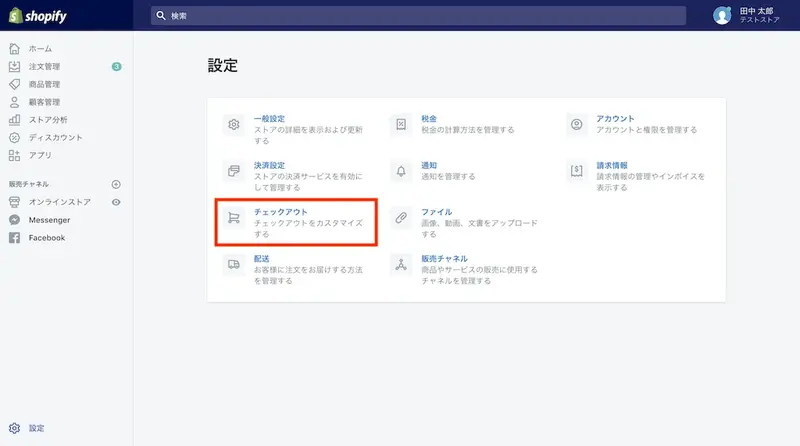
After logging into the admin panel, click "Settings" > "Checkout".
Select "Require account creation" and click the "Save" button.
[Download Materials] Want to create a website that encourages continued use and repeat purchases? The first step in building a members-only site with Shopify is to enable the customer account feature. By setting it up so that customers can create and log in to accounts, you can create an environment where only members can view and purchase content.
For more information on customer management using member information, please refer to the "EC CRM Guide."
Complete Guide to EC CRM Integration | Thorough Explanation of Data Integration, Implementation Patterns, and Operational Design
2. Add liquid code
*The original article can be found here.
For more details on customer retention strategies for members, please refer to the "CRM Strategy Guide."
The Complete Guide to CRM Strategies | A Thorough Explanation from Segment Design to Post-Purchase Journey
read more
- This guide explains how to set up and specify a domain name for your online shop.
- 33 Recommended Shopify Themes by Industry
- This guide will show you how to create a B2B wholesale store using Shopify!
- 12 Ways to Sell Intangible Goods Online
- [Must-Read Guide] Introducing Payment Services You Can Use with Shopify
- How to develop Shopify apps and themes
- Online Shop SEO Checklist
- Three reasons why "website speed" is important for online shops
FAQ
What should I do if I can't decide on a name?
What should I do once I've decided on a name?
It's legal to use, but another company is using it. What should I do?
What should I do about the domain?
My social media account name has already been taken. What should I do?
The Complete Guide to Improving E-commerce LTV: A Thorough Explanation of Formulas, Strategies, and KPI Design
(About GO RIDE)
Based in Yokohama and Los Angeles, we provide end-to-end services ranging from e-commerce site creation using Shopify and corporate website development to digital marketing. We also support Japanese companies entering the North American market and American companies entering the Japanese market in the digital realm.
Our company media outlet, GO RIDE NEWS, publishes information ranging from production to digital marketing.
Turn your business idea into reality right away!
Share this article
- Share on Facebook
- Share on X
- Share on LinkedIn