跨境独立站开店
Post-purchase checkout extension: Available in beta access.
At Shopify, we are constantly dedicated to providing a world-class commerce experience that meets the evolving needs of the industry and the rapidly changing expectations of merchants and consumers.
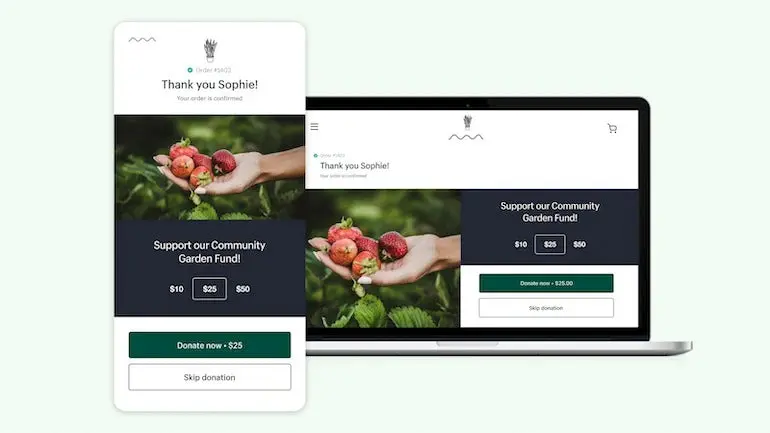
This article explains the benefits and usage of Shopify's Post-Buy Checkout extension. Let's explore its various uses, such as offering coupon codes and upselling.
At Shopify, we are constantly dedicated to providing a world-class commerce experience that meets the evolving needs of the industry and the rapidly changing expectations of merchants and consumers.
It is crucial to be able to assure merchants that the core commerce experience is fast, reliable, and scalable.
At the same time, it's essential that the system has the flexibility to adapt to the needs of merchants. So, if a merchant wants to expand their business model by launching a subscription service, or explore growth opportunities through other niche commerce experiences, they can choose from the wide range of options built within our partner ecosystem.
One such example is the post-purchase experience. This refers to the interaction between the merchant and the customer after they have completed their purchase but before they leave the store. It falls between the checkout and thank you pages, and because customers are highly engaged, it's an ideal place to offer upsells, surveys or donation requests, or discounts for future orders.
We knew that the Shopify ecosystem had many developers who could bring their expertise and creativity to the post-purchase experience. Furthermore, we can provide a fast, reliable, and secure checkout. Combining these two strengths, we believed we could build an infrastructure that would allow developers to utilize post-purchase app extensions to create apps that integrate with Shopify checkout.
At the end of last year, we launched the first set of post-purchase apps with selected partners. Today, we are pleased to announce that beta access is now open to the entire developer ecosystem. You can now build post-purchase experiences directly with Shopify checkout and support merchant growth.
We are pleased to announce today that beta access has opened up to the entire developer ecosystem. You can now build the post-purchase experience directly with Shopify Checkout and support merchant growth.
Try out the beta version of the post-purchase checkout extension.
Learn how to create a post-purchase checkout extension, run it on a local server, test it in your development store, and build the post-purchase experience for your merchants.
The following is possible with the post-purchase checkout extension:
- Built within Shopify Checkout: Because it integrates directly with Shopify Checkout, you can leave the fast, stable, world-class checkout functionality to Shopify and focus on building a great after-sales experience for your users and customers.
- Fully integrated with Shopify: Your app will always be compatible with Shopify platform improvements, API updates, and all features. The Post-Buy extension runs natively on the Shopify platform, so your app works seamlessly with features like discounts, shipping, reporting, and payments.
- Merchant Business Growth: Your after-sales app plays a crucial role in supporting merchants in achieving their goals and growing, from increasing average order value through upsells and gathering important customer information through surveys to promoting future business growth.
How the post-purchase checkout extension works
The Post-Buy Checkout extension allows developers to integrate the post-buy experience directly into Shopify checkout. This uses a new technology created by Shopify called App Bridge Checkout. Post-buy extensions are built in JavaScript or TypeScript using the App Bridge Checkout component and pushed to Shopify servers for hosting and publishing.
Once a customer completes checkout, the Post-Purchase Checkout extension displays a post-purchase page, depending on the conditions. The extension uses fetch and associated globals to send HTTP requests to the server, transfers contextual data to obtain appropriate cross-sell offers, and renders the offers using the App Bridge Checkout component. Because the extension is hosted and rendered on Shopify, the checkout functionality is highly performant, accessible, and consistent.
Building diverse post-purchase experiences
The Post-Purchase Checkout extension renders on the interstitial page after the customer has checked out, before the thank you page is displayed. There's a wide range of possibilities in this space, and we look forward to seeing how the beta app extension is used in creative ways.
For inspiration, here are some common usage examples.
- Upselling: Upselling is a common example of post-purchase experience. Typically, it involves suggesting products that complement the purchased item in order to increase the average order value. At scale, it can become a significant revenue stream that contributes to the merchant's profits.
- Surveys: Merchants can use post-purchase pages to gather information about their customers. Valuable information can be used for product, marketing, and sales planning. While requesting surveys via email can be time-consuming, customers who are already actively engaged with the merchant are more likely to dedicate a few minutes to answering important questions.
- Donation Requests: You can use your purchased space to request donations to support your business during these challenging times of the pandemic, or to support other organizations such as your favorite charities.
- Promotional Offers: After purchase, you can offer discount codes, referral coupons, and other promotions that can be used for future purchases on the post-purchase page.
- Other important information: Merchants can utilize the post-purchase page in various ways. They can choose to display links, PDFs, or other information they wish to present to their customers.
The diverse ways in which post-purchase pages can be used are clear, making the opportunity to build something with post-purchase app extensions exciting. We hope that even more interesting uses will be discovered through the beta version.
How do I start using the post-purchase checkout extension?
Getting started with the Post-Purchase Checkout extension is easy. You can start building your app in the developer store today.
Once your app is created and ready for approval, you'll need to submit it for review (this is a required step for all apps offered on the Shopify App Store). Please note that app developers who want to add post-purchase extensions to existing apps also need to go through this approval process.
For more detailed information, including how to get started, requirements, and limitations, please refer to the detailed developer documentation (in English).
Building an app for merchants
Original text by Mandy Pardehpoosh, translated by Nozomi Fukatsu
Share this article
- Share on Facebook
- Share on X
- Share on LinkedIn