跨境独立站开店
Shopify organization and user management
This guide explains Shopify's organization and user management. We'll also cover how to streamline user management by utilizing role-based access control (RBAC), which makes adding user permissions and other user permissions easier.
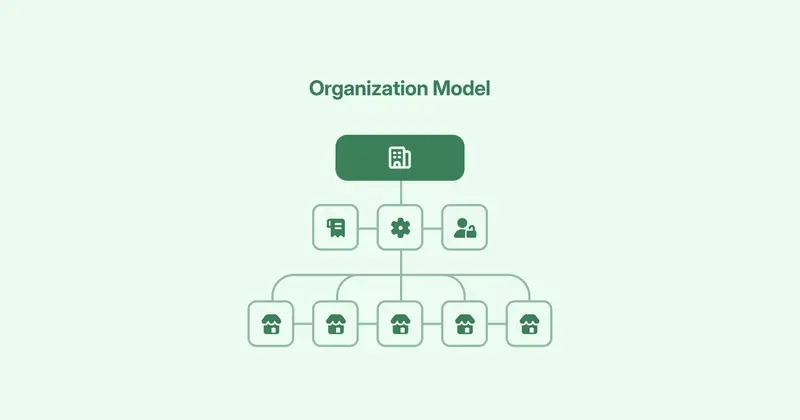
This article explains how to manage users using Shopify's "Organizations" feature and "Role-Based Access Control (RBAC)."
As your e-commerce business expands, the number of stores and staff may increase, potentially diverting resources to management tasks and making it difficult to focus on business growth-oriented activities such as product development and marketing.
If you are using Shopify, you can potentially overcome this situation by using "Organization" settings and "Role-Based Access Control (RBAC)" to centralize the management of multiple stores and improve operational efficiency.
This article explains what Shopify organizations and RBAC are, the benefits of using them, and how to use them. Let's aim to improve operational efficiency and productivity by effectively utilizing organizations and RBAC.
What is a Shopify "organization"?
A Shopify "organization" is a system that allows you to group multiple Shopify stores together and manage them collectively. From the organization's management screen, you can centrally manage billing information, user access permissions, and organization-wide settings for multiple stores.
By leveraging an organizational structure, you can reduce the effort required for managing each store individually and streamline the operation of multiple stores. This is especially beneficial for companies that operate stores for multiple brands or regions, as it reduces the burden of management tasks and makes it easier to accommodate business expansion.
How to set up an organization
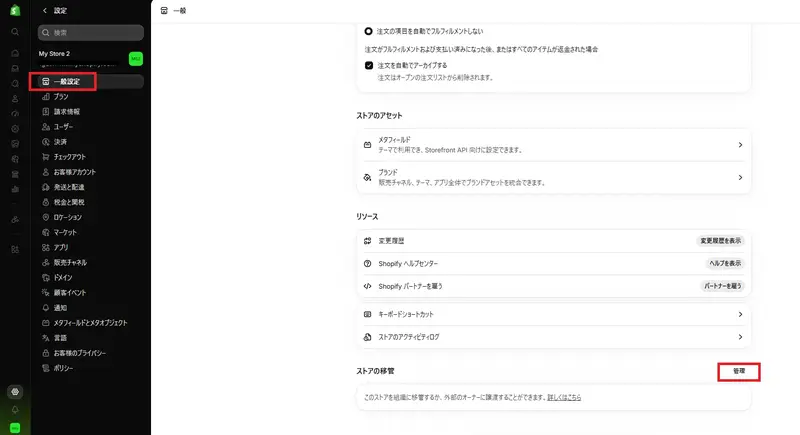
- Navigate to "Settings" > "General Settings" from the admin panel.
- Click "Manage" in the Store Migration section.
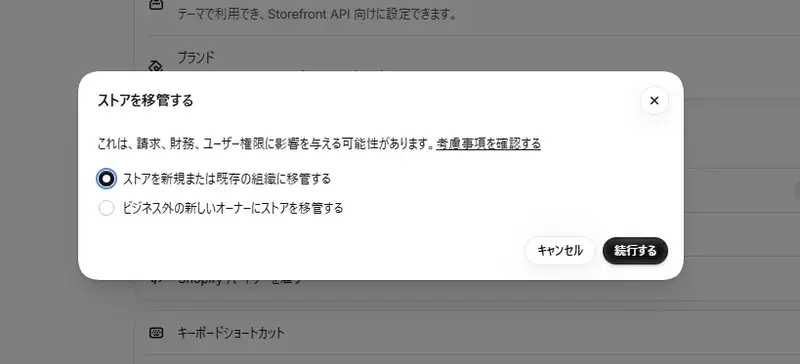
- In the store transfer dialog, select "Transfer store to a new or existing organization" and click "Continue".
- To group stores into an existing organization, select the organization to which you want to add the stores.
- To create a new organization, click "Create Organization" and enter the organization's name.
- Click "Continue" to review the details and confirm.
Role-based access control (RBAC) is
Role-based access control (RBAC) is a system that manages access rights by setting up "roles" that group together the necessary access permissions according to job duties and responsibilities, and then assigning those roles to users.
Benefits of using role-based access control (RBAC) for user management
- User management becomes easier.
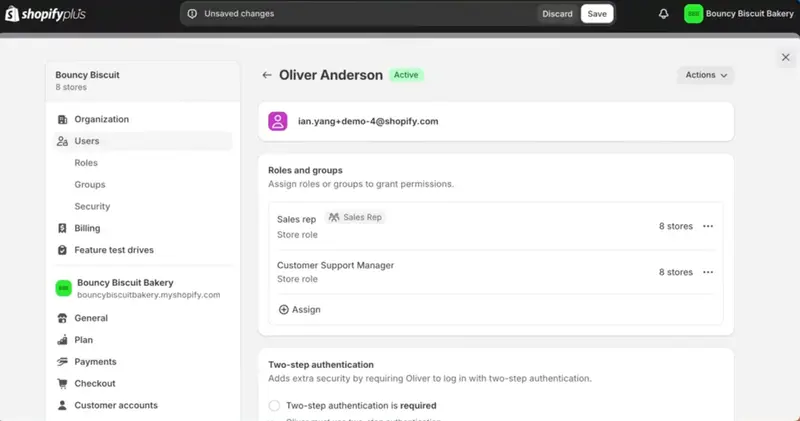
- One person can be assigned multiple roles.
- Permissions can be assigned on a group-by-group basis.
Role-based access control (RBAC) allows you to quickly grant all the necessary permissions for a new job or a change in assignment simply by selecting and registering the appropriate role when hiring new staff.
This eliminates the need for cumbersome manual permission granting, allowing for easy user management while maintaining operational consistency.
RBAC allows you to assign multiple roles to a single user, ensuring that permissions are granted without fail even when different roles require different access privileges or when a user holds multiple responsibilities.
For example, if a staff member needs access to both "merchandiser" and "marketing" roles, you can assign them both roles simultaneously. By utilizing RBAC, you can flexibly adjust staff roles as your business grows, making it easier to adapt to changes in operations.
Permissions can be assigned on a per-user group basis.
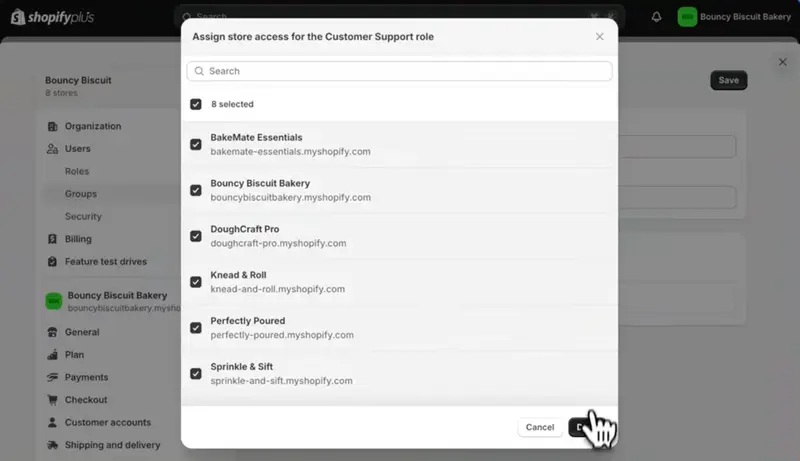
With the Shopify Plus plan, you can group users with similar roles and assign permissions to them in bulk, making it easier to set up roles for new staff, change roles within your organization, and manage a large number of users.
For example, when you hire a new customer support staff member, simply assigning them to the "Domestic Customer Support" group will grant them the same responsibilities and store access settings as staff members who already have the necessary permissions.
How to implement user management using RBAC
- Check which users have "User Management" privileges.
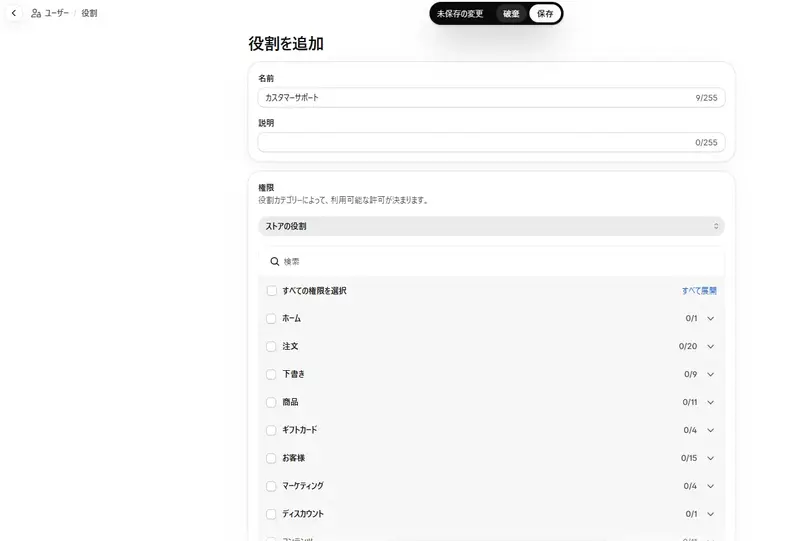
- Create and assign roles.
1. Identify users who have "User Management" privileges.
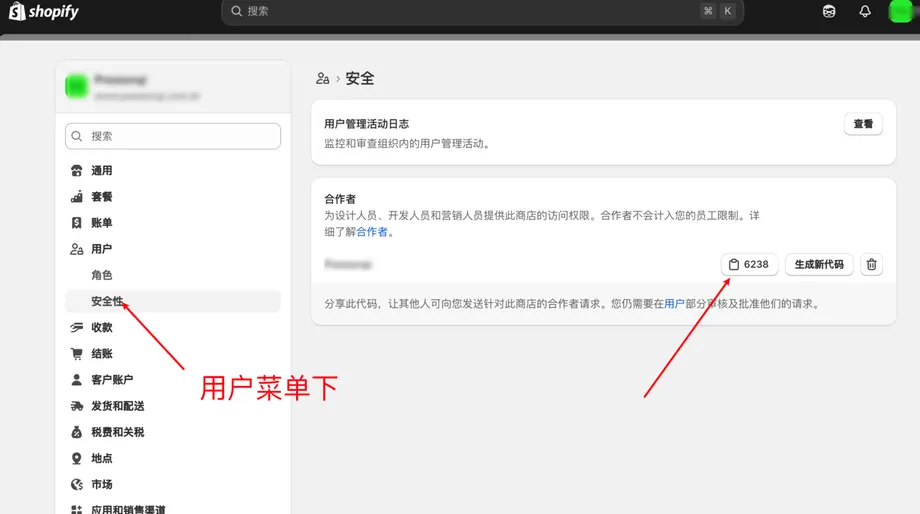
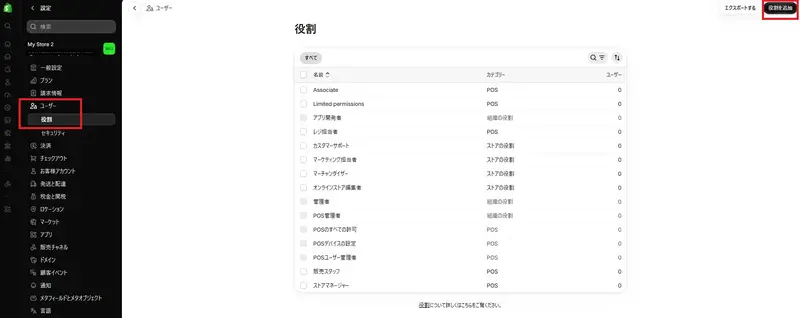
Users with "User Management" privileges, which allow them to add or delete users and change their roles, can be viewed in the administration screen under "Settings" > "Users" > "Roles".
The following users have user management privileges:
- Organization or store owner
- Users with the role of organizational manager within an organization
- Users with the "Store User Administrator role in the organization"
- A user with the role of POS user administrator
2. Create and assign roles.
From the "Settings" > "Users" > "Roles" page in the administration panel, you can create roles that group permissions by job function and assign them to each user to grant them the necessary access permissions for their job function all at once. Users can be assigned multiple roles and will be granted permissions for all assigned roles.
By combining organizational features with role-based access control (RBAC), you can centrally manage multiple Shopify stores and efficiently manage users. This eliminates the need for significant adjustments when expanding your business, such as opening a new store alongside existing ones, reducing operational management resources and allowing you to focus on tasks that lead to further growth. If you're using Shopify, be sure to leverage organizational features and RBAC to improve your productivity.
Frequently Asked Questions about Shopify Organization and User Management
What are organizational functions?
Organization features allow you to integrate multiple Shopify stores using the same billing currency into a single platform for centralized management. This enables you to manage billing, user permissions, store settings, and more from a single dashboard, improving operational efficiency and convenience.
What is Role-Based Access Control (RBAC)?
Role-based access control (RBAC) is a system that sets up "roles" that combine the access permissions required for each job function. Instead of granting the necessary permissions directly to each user within a store or organization, it grants the necessary permissions collectively in the form of roles.
What are the advantages of using RBAC for user management?
- With the Shopify Plus plan, you can assign permissions to each user group.
Share this article
- Share on Facebook
- Share on X
- Share on LinkedIn