跨境独立站开店
How to use Amazon Pay in your Shopify store
By adopting Amazon Pay as a payment method for your online shop, customers can skip registering payment information and entering addresses; they simply log in with their existing Amazon Pay account! It's compatible with both mobile and desktop, so they can shop from anywhere in just a few clicks.


Finally! Shopify and Amazon Pay payment integration has launched in Japan! Why not offer your customers a fast, easier, and more secure shopping experience with Amazon Pay?
Why not offer your customers a fast and secure shopping experience with Amazon Pay?
What is Amazon Pay?
Amazon Pay is a service that allows you to pay for goods and services using the address and credit card information registered to your Amazon.co.jp account.
Amazon Pay is incredibly easy to use; you don't need to register payment information or enter your address. Simply log in with your existing Amazon Pay account! Amazon Pay is compatible with both mobile and desktop devices, allowing you to shop from anywhere with just a few clicks. And now, it even supports Amazon Pay gift cards! Try out the unbeatable Amazon Pay today!
To use Amazon Pay on your Shopify store, you need to apply for an Amazon Pay account beforehand and complete the pre-implementation review. If you haven't done so yet, please register for an account using the application button below.
Once you have completed your account application and pre-implementation review following the manual above, let's take a look at how to use Amazon Pay (you will receive an email from Amazon Pay to your account email address confirming the completion of the review).
How to use Amazon Pay
Step 1
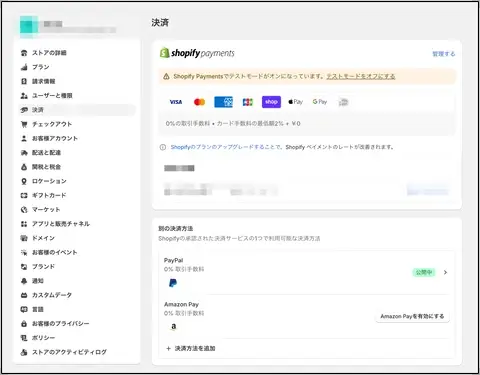
First, log in to the admin panel of your current Shopify store. Click on "Settings," and then select "Payments."
Step 2
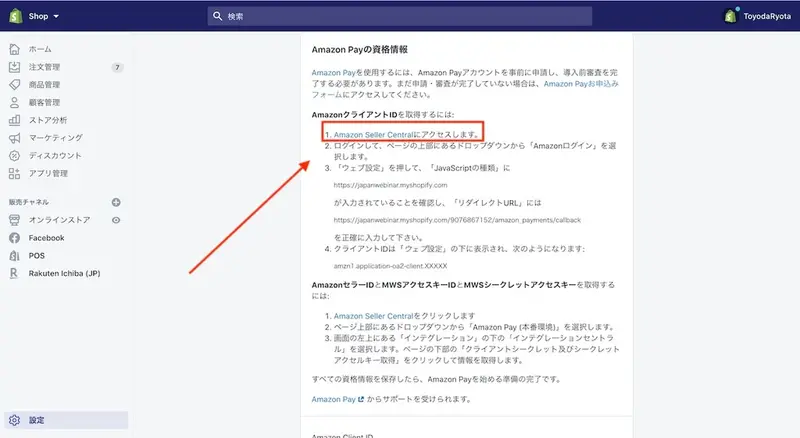
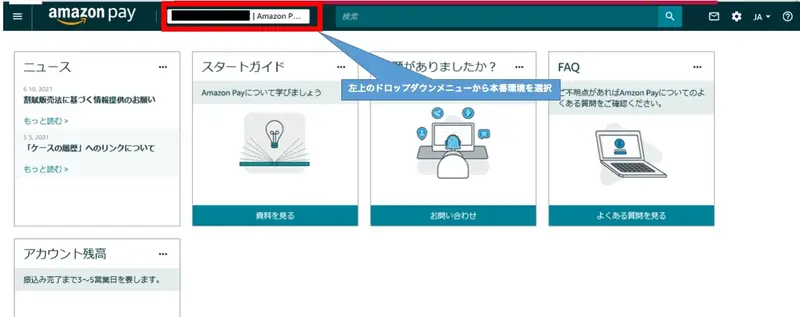
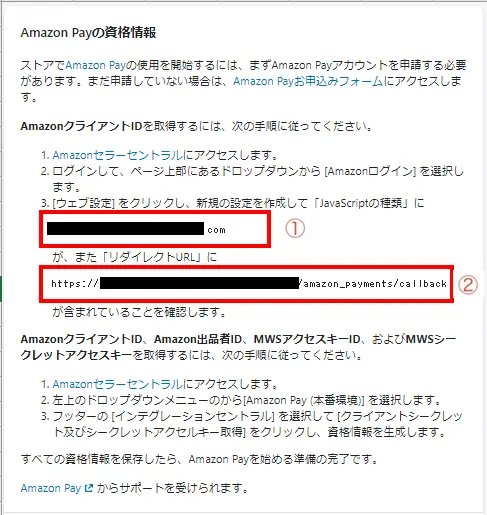
There is an Amazon Pay section, so click "Enable Amazon Pay," and the subsequent setup instructions will be displayed. Click "Amazon Seller Central" in the instructions. If you have not yet applied for and been approved for Amazon Pay, please apply here.
Step 3
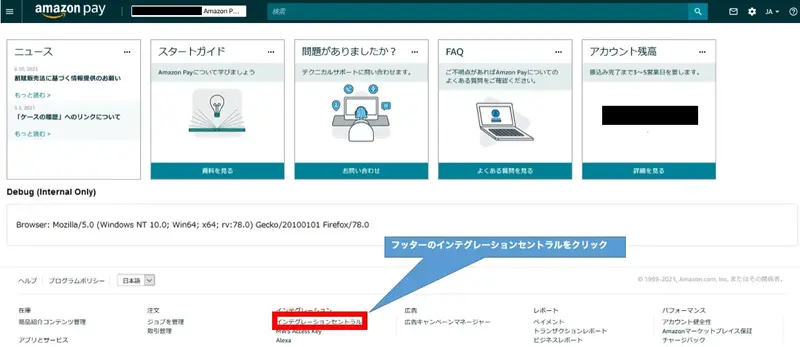
Select Integration Central from the Integrations menu at the bottom.
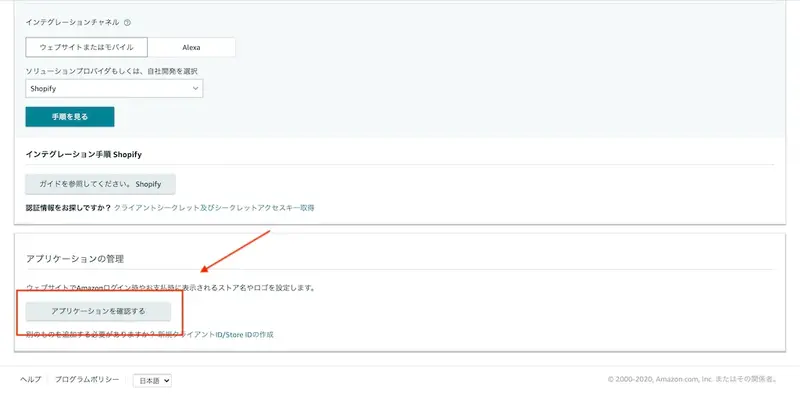
Next, click "Verify Application".
Step 4
Click “Edit”.
Enter the application information. Enter the store name, store description, and privacy policy URL.
Next, from the Shopify admin panel, go to Settings > Payments > Enable Amazon Pay.
Please enter the information from the Shopify admin panel above into the Amazon Pay seller central below.
Step 5
Next, we will obtain the client secret and secret access key.
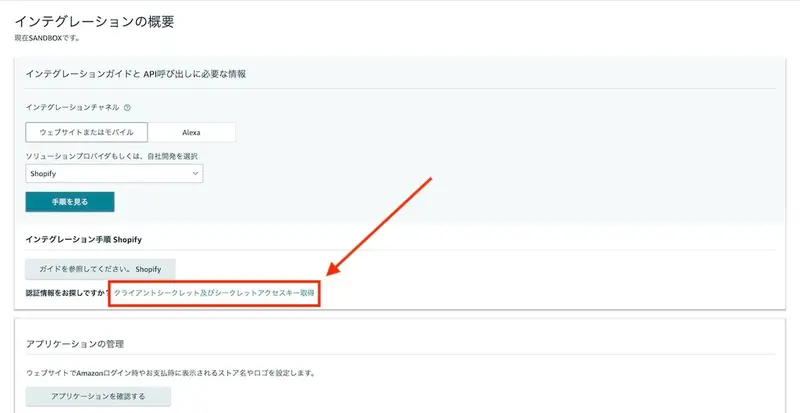
From "Integration" in the upper left corner, select "Integration Central".
Click on "Obtain Client Secret and Secret Access Key" at the bottom of the section titled "Integration Overview".
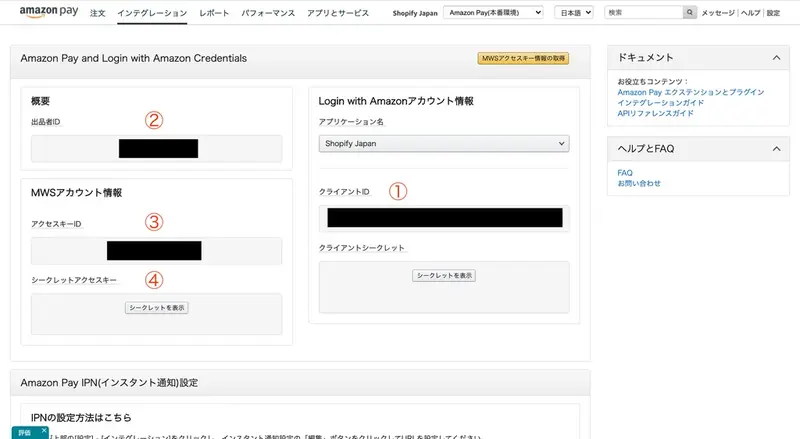
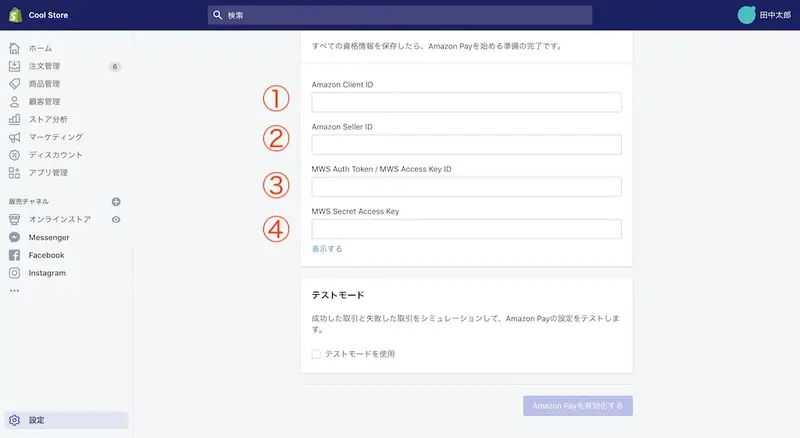
The following will be displayed: ① "Amazon Client ID", ② "Amazon Seller ID", ③ "MWS Auth Token (Access Key ID)", and ④ "MWS Secret Access Key (Secret Access Key)". Please copy and paste these strings into the corresponding fields in your Shopify admin panel.
Click "Enable Amazon Pay" and save.
*It may take some time for the changes to be reflected. (In some cases, it may take up to two days. Thank you for your understanding.)
That completes the setup!
--------
*Amazon Pay is available to businesses that meet the following conditions.
A corporation based in Japan that can provide a copy of its company registration certificate.
- Sellers who do not handle prohibited products in the business categories prohibited by Amazon Pay's regulations, or on their websites where Amazon Pay is implemented.
For more details, please see the Amazon Pay help page.
Furthermore, Amazon Pay, which is available in Japan, is a service for customers who have an Amazon.co.jp account and only supports payments in Japanese yen.
If payment cannot be made
If your payment fails or you encounter an error, please check the following two things.
- Different JavaScript origin and return URL
If you changed your online shop's domain after setting up Amazon Pay, please verify that the JavaScript origin and return URL in the admin panel are the same as those you set in Seller Central.
Add Amazon Pay to your Shopify store and provide your customers with an easy purchasing experience!
read more
- [How to Use Shopify] Opening an Online Store: Basic Setup
- This guide explains how to set up and specify a domain name for your online shop.
- Shopify and Rakuten Ichiba have started their sales channel integration!
- [Latest Feature] Easy implementation with Shopify! Introducing "Mobile Carrier Payments" to boost your online store sales.
- Shopify Official Store Setup Guidebook 2022 Edition Released! Start your online store with Shopify!
- This guide explains how to link Shopify with Instagram!
- Checklist for setting up a Shopify store
- Paidy's next-month payment service eliminates the hassle often associated with payments! [Until July 31st!] New user campaign underway!
- Shopify Payments has arrived in Japan!
FAQ
What is Amazon Pay?
Can Amazon Pay and Shopify be integrated?
What are the costs of integrating Amazon Pay with Shopify?
Can anyone implement Amazon Pay?
What are the benefits of Amazon Pay?
Share this article
- Share on Facebook
- Share on X
- Share on LinkedIn