跨境独立站开店
How to customize the appearance of your shop
Learn how to customize the appearance of your shop. Explore our new customization features to express your brand's world and use them to provide an improved shopping experience.
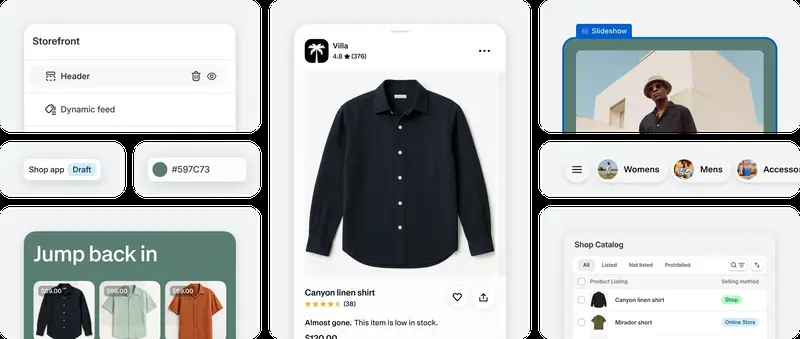
This guide will show you how to customize the appearance of your shop.
The appearance of your shop significantly impacts brand perception, product discoverability, and the overall shopping experience. Shopify Shops allow you to customize product detail page presentation, checkout process, brand image, and customer personalization to provide a unique shopping experience for your brand. You can maintain a consistent brand identity while creating a smooth shopping environment for your customers.
This article provides a clear explanation of how to customize the appearance of your shop and the key points to keep in mind when setting it up, based on information available as of 2026.
Customize the product details page for your shop.
In Shop, you can customize the design of your product detail pages (PDPs) using the Shop Editor. You can add sections below the product information to convey your brand's worldview and product features, creating visually appealing and easy-to-understand product pages. You can add up to two sections per page, and you can use five different blocks depending on your needs.
The main blocks available are as follows:
- Video: A video showcasing the product in actual use and highlighting its features.
- Slideshow: Displays images and videos in a carousel format, with text overlaid to convey a message.
- Product Group: List up to 4 related products to facilitate cross-selling.
- Shoppable videos: Videos tag products within the video, allowing viewers to purchase them directly while watching.
Furthermore, by utilizing product templates, you can change the displayed content for each product or category. For example, you can display a size chart for running shoes and a styling guide for hats.
Customizations are reflected in both the Shop app and the web version (shop.app). By adding optimal information and brand expressions for each product, you can communicate the appeal of your products more clearly and provide a consistent brand experience.
Set the checkout method for the shop.
In Shop, you can flexibly set the checkout method by using "direct selling" and "referral selling" for each product. With direct selling, you can set up the product to be purchased directly on Shop.
On the other hand, with referral sales, products are made discoverable on the shop, but customers are redirected to the company's own online store to check out when they make a purchase. This method is suitable for products that require customization of specifications or products with complex variations.
By using these methods appropriately, you can reduce the effort required to meticulously manage the products displayed in your shop while making it easier for customers to discover more products. Furthermore, you can offer the same brands and products across your shop and online store, while selecting the optimal purchase path tailored to the characteristics of each product.
Sales methods can be set for the entire store or on a product-by-product basis. From the Shopify admin screen, go to "Shop > Settings > Sell with Shop" and select either direct sales or referral sales. By setting the appropriate settings for each product, you can optimize the user journey within your Shop and drive traffic to your own online store.
Providing a personalized shopping experience for each customer.
Shop allows you to change the store's content based on customers' interests and browsing history, rather than displaying the same product list to all customers. This enables brands to showcase the products and collections they want to highlight while providing a personalized shopping experience for each individual.
For example, the "Jump back in" card prominently displays items that customers have recently viewed. This makes it easy for them to quickly revisit items they were interested in after leaving the site, encouraging them to resume their shopping. Additionally, the "For you" card utilizes the shop's recommendation features to display personalized product recommendations for each customer.
Furthermore, you can pin collections you particularly want to highlight at the top of your page. This is useful for prioritizing the display of best-selling or new products, and can be configured in the Shopify admin panel under "Shop > Store > Customize". Menu navigation will also appear below the header, making it easier to navigate to desired products or categories.
In addition, discount codes can be displayed in each customer's "Deals Feed." By combining personalized suggestions with brand-specified collections and campaigns, you can create a store experience that makes it easier for customers to find products and consider purchasing them.
Four points to customize the appearance of your shop
When customizing the appearance of your shop, it's important to design not only the visual aspects but also the product presentation, brand expression, and the individual customer shopping experience as a whole. Optimizing the content displayed on product pages and the way recommended products are presented makes it easier to create a sales floor that suits your brand.
The four points you should pay particular attention to are as follows:
- Showcase products in a brand-appropriate way: Use images, videos, and slideshows to visually communicate product features, usage scenarios, and the brand's worldview. Displaying related products can also lead to cross-selling opportunities.
- Unifying the brand image: By adhering to brand guidelines and aligning product presentation and visuals across online stores and physical shops, you can provide a consistent brand experience regardless of the sales channel.
- Personalize for each customer: You can display browsing history and recommendations to provide a shopping experience tailored to each customer's interests. By setting up fixed collections to display, you can effectively promote best-selling and new products.
- Seamless integration with Shopify: You can configure products, collections, and sales methods from the Shopify admin panel, allowing you to manage your shop and online store all in one place.
By keeping these points in mind, you can create a shop that maintains your brand identity while providing a smooth experience from product discovery to purchase.
By customizing the appearance of your shop, you can convey your brand's worldview while providing customers with a smooth shopping experience that makes it easy to find and purchase products. Product detail pages can utilize images, videos, and related products, and support personalized recommendations and fixed collection displays.
Furthermore, by using both direct sales and referral sales, you can design a purchase funnel tailored to the characteristics of your products. Review the various settings from the Shopify admin panel and build a Shop that suits your brand. Shop can also be used as a free customer acquisition channel to help more people discover your products.
Frequently Asked Questions about Customizing Your Shop
Where can I customize the appearance of my shop?
You can configure the appearance and content of your shop from the Shop channel in the Shopify admin panel. You can fix collections and customize your store from "Shop > Store > Customize". For product detail pages, you can add content such as images, videos, and slideshows using the Shop editor.
What can I add to the product details page in my shop?
Shop's product detail pages allow you to add blocks such as images, videos, slideshows, product groups, and shoppable videos. You can also use different templates for each product; for example, you can display a size chart for shoes and a styling guide for apparel.
Can the design be unified between the physical store and the online store?
By adjusting brand images, product visuals, and collection presentation, it's possible to align the brand image across physical stores and online stores. This makes it easier to provide a consistent brand experience even when sales channels change.
Can the shop display different content for each customer?
Yes. Shop offers personalized displays for each customer, such as "Jump back in," which shows recently viewed items, and "For you," which uses Shop's recommendation function. Furthermore, brands can set fixed collections to be displayed, prioritizing the showing of best-selling or new products.
Share this article
- Share on Facebook
- Share on X
- Share on LinkedIn