 跨境独立站开店
Shopify adds a new feature: Manage Google and Facebook ads in the marketing section.
Shopify has added a new feature. Previously, when running ads on Google or Facebook, you had to go to each platform separately. However, Shopify now integrates directly with Google Smart Shopping campaigns and Facebook Ads, making it easier than ever to manage your ads.
When running an online shop, one question inevitably arises: "How do I get traffic?" How do people discover your store? How do they find your products? If you run a physical store, the store's appearance and the rent you pay are important things that customers see.
When running an online shop, one question inevitably arises.
"How do you get traffic?"
How do people discover your store? How do they find your products? If you run a physical store, the things that customers see, such as the store's appearance and the rent you pay, are important.
On the other hand, in the e-commerce business, paying for advertising is the new form of rent.
Advertisements serve a similar purpose to a physical storefront, allowing you to choose who sees them. However, managing ads is becoming increasingly complex. There's a lot to learn, such as Pixel and keywords. For small businesses, keeping up with all the new information can be challenging.
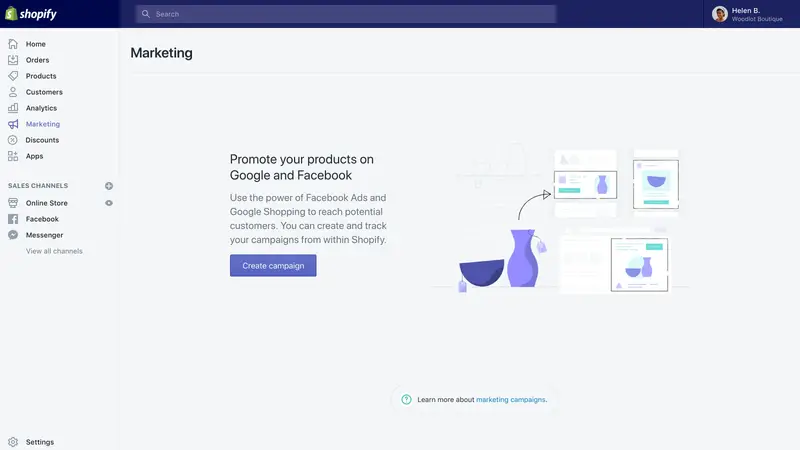
And that's why Shopify developed its marketing section. It brings together a single place to create, manage, and measure campaigns, making it easier and more efficient to run advertising campaigns than ever before. Let's get started running Google Smart Shopping campaigns and Facebook ads within Shopify.
Start the first campaign
Easily access the world's largest advertising platform
Google and Facebook attract billions of users every day. Your ideal customers are likely already using these platforms. So, we've made it easier to reach them.
Now you can create, manage, and track your marketing all in one place with Shopify. One of the hassles of managing multiple platforms is having to constantly switch tabs. But with Shopify, you don't have to worry about that anymore.
Google Smart Shopping Campaign
Shopify is the first e-commerce platform to integrate with Google's new Smart Shopping campaigns. Smart Shopping is a feature that allows you to run efficient Google campaigns without the hassle of setting up complex ads.
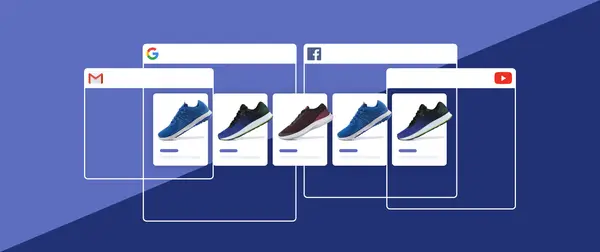
Once you set your campaign's daily budget from the Shopify admin panel, it automatically determines and optimizes who to target, how much to bid, and which products to advertise. Google automatically imports product data from Shopify, creates ads, and displays them to customers in the most relevant desktop and mobile locations (Google Search, Gmail, YouTube, and GDN). Furthermore, Google's machine learning analyzes the results and constantly optimizes them, so you don't need to worry about tedious settings or adjustments.
Facebook Ads
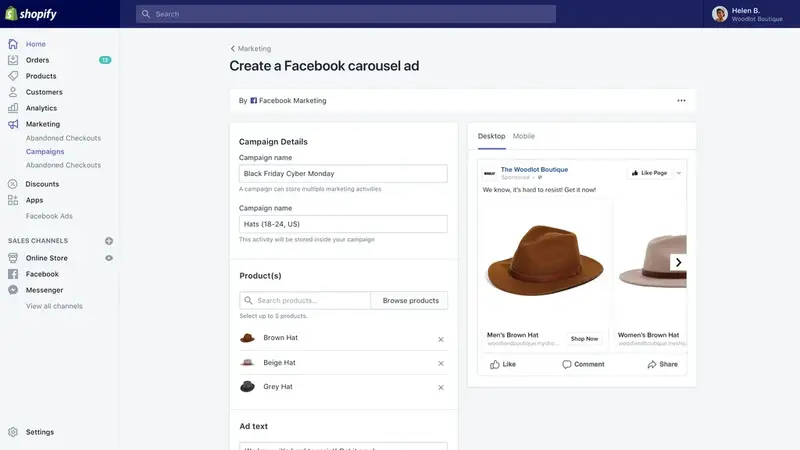
Furthermore, Shopify has made it easier to manage Facebook carousel ads.
Facebook carousel ads tell more stories than static ads. You can add up to five products or images, and the format is designed to encourage clicks. We've also added several best practices to the setup process so you can target your products and goals to the most accurate audience.
We are also currently working on implementing other types of Facebook ads. Please be patient while we do!
Get results faster
Setting up ads on Shopify lets you build all your campaigns in no time. When you create an ad, Shopify automatically imports product images, titles, and descriptions from your store.
Furthermore, it's worth noting that you can analyze results within Shopify itself. There's no longer a need to switch to other platforms to compare results, as was previously required. Additionally, it provides recommendations for the next steps based on your store and campaigns, making management even easier.
Using pay-per-view advertising will allow you to see results from it much faster. Paid advertising is the fastest way to grow your business.
There are many free marketing strategies available. However, in most cases, while they may be free, they will take time. If you're looking for quick results, such as during BCFM or the Christmas season, paid advertising is a great option, especially if you're just starting out in business.
Making campaigns easier
Google and Facebook ads are undoubtedly effective ways to reach your ideal customers and increase sales. However, the increasing complexity on each platform can become a barrier to operation, especially for small teams and businesses.
Shopify's new features make it easy to create, manage, and track campaigns without marketing skills or complex learning. It's now easier to set up effective ads and watch your growth.
Furthermore, we plan to introduce new tools to our marketing section in the future. By integrating popular apps from the Shopify Appstore with our marketing section, we will make marketing simpler than ever before.
read more
- Emoji SEO: 11 Reasons Why You Should Use Emojis to Improve Your Search Rankings
- [Basics of Apparel Photography] With specific tips! How to take beautiful product images
- Simple ways to attract customers to your store when launching an e-commerce site
- Let's understand Instagram's algorithm!
- Utilize Instagram posts on your e-commerce site: Increase your conversion rate by integrating with "Snapppt"!
- 8 Content Marketing Trends You Can No Longer Ignore
- How to Write a Stylish Instagram Profile to Increase Your Followers: The Complete Guide
- [Thorough Explanation] How to Use Instagram Stickers Effectively
FAQ
What is Shopify's marketing section?
What are the benefits of Shopify's marketing section?
What can be managed from the marketing section?
When will Shopify's marketing section become available?
Share this article
- Share on Facebook
- Share on X
- Share on LinkedIn


