 跨境独立站开店
Utilize Instagram posts on your e-commerce site: Increase your conversion rate by integrating with "Snapppt"!
In the US and Europe, the marketing method of using Instagram posts on e-commerce sites is spreading. In Japan, the number of e-commerce sites using Instagram for sales promotion is also increasing. The most standard way to use it is to post product images and install an Instagram widget on the e-commerce site, but this time we will introduce "Snapppt," a free tool that allows customers to purchase products directly from the widget.

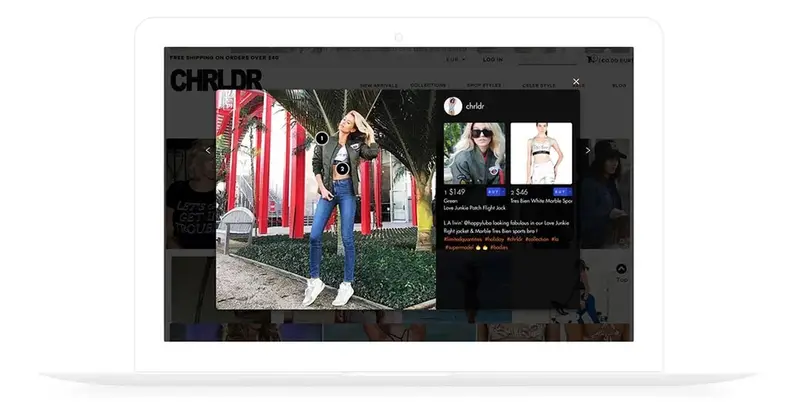

In the US and Europe, the marketing method of using Instagram posts on e-commerce sites is spreading. In Japan, the number of e-commerce sites using Instagram for sales promotion is also increasing. The most standard way to use it is to post product images and install an Instagram widget on the e-commerce site, but this time we will introduce "Snapppt," a free tool that allows customers to purchase products directly from the widget.
What is Snapppt?
Snapppt is a free tool that allows you to reuse images from your Instagram posts to create a shopping-ready profile.
This makes it possible to reuse images posted on Instagram on your own website.
Through profile pages and embedded widgets, users and followers can directly access product pages where they can purchase products.
What you can do with Snapppt
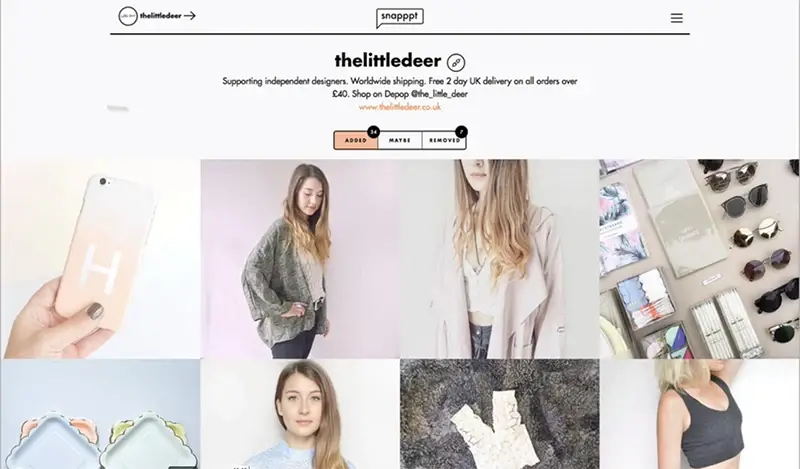
Snapppt allows you to select and display only the products you want to sell from your Instagram posts. After selecting the post images you want to display, you can add up to 10 product links to any location on the image.
[Image of Snapppt profile page]
Snapppt offers an embedding feature that allows you to place a Snapppt feed on any page of your website or store, enabling you to integrate it into your website as a gallery, catalog, or Instagram shop where your own content can be purchased directly.
[Snappt widget embedding image]
Benefits of using Snapppt on an e-commerce site
While sections displayed on the top page of an e-commerce site typically include banners for new arrivals, recommended products, categories, and seasonal fairs, installing Snapppt's embedded widget increases the ways in which users can see products, which can lead to an expected increase in product conversion rates.
Unlike plugins or apps that display Instagram feeds, this links directly to the product details page, allowing for direct purchase, thus directly linking to product sales.
By installing the Snapppt widget on your own e-commerce site, you can significantly promote your Instagram account and increase your Instagram follower count.
Points to note when using Snapppt
- As this is merely a plugin to bridge the gap between Instagram and your company's e-commerce site, links to product pages added via Snapppt will not be displayed on your Instagram account. Links to product pages will only be displayed on your Snapppt profile.
- Your Snapppt profile page and embedded Snapppt widget will only display images from posts that you have selected and added through your Snapppt settings. It's designed to curate only the items you've chosen, rather than automatically displaying all of your Instagram posts.
Click here to install Snapppt
For e-commerce site management, attracting customers through Instagram has become indispensable. Since it's free and allows for secondary use of posted images, it's definitely worth trying if you have an Instagram account that you're not fully utilizing.
Additionally, Shopify has introduced a shopping feature that allows you to sell products directly on Instagram, so we encourage you to try that out as well.
*The original article can be found here.
read more
- How to create a members-only website with Shopify
- An Introduction to TikTok Advertising: How to Use TikTok for Your Company's Marketing
- Instagram Marketing Guide: How to Accelerate Your Business Using Hashtags, Stories, and More
- Emoji SEO: 11 Reasons Why You Should Use Emojis to Improve Your Search Rankings
- A Beginner's Guide to Getting Started with Facebook Ads: From Account Setup to Ad Creation and Optimization.
- [Essential Guide] List of Japanese and World Anniversaries You Can Use in Social Media Marketing
- Implement chat support in your online shop! Introducing customer service strategies to enhance your customer experience.
- Customer retention is a method of building relationships with existing customers and encouraging them to make further purchases.
- Top 3 Email Personalization Tactics
- How to use Shopify with WordPress
FAQ
What are the advantages of using Snappt?
What are the features of Snapppt?
What are some points to be aware of when using Snapppt?
Who would I recommend Snapppt to?
(About GO RIDE)
Based in Yokohama and Los Angeles, we provide end-to-end services ranging from e-commerce site creation using Shopify and corporate website development to digital marketing. We also support Japanese companies entering the North American market and American companies entering the Japanese market in the digital realm. Our own media outlet, GO RIDE NEWS, publishes information on everything from website creation to digital marketing.
Share this article
- Share on Facebook
- Share on X
- Share on LinkedIn


