 跨境独立站开店
Instagram sales channel has arrived in Japan! Sell your products on Instagram!
Shopify and Instagram integration has finally arrived in Japan! You can now connect your online shop with Instagram, allowing you to sell and purchase products directly from your Instagram posts.

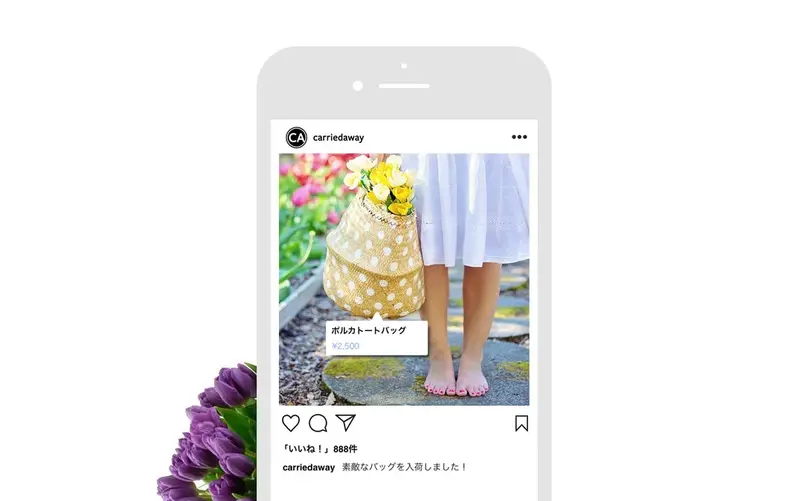
Big news for everyone in Japan! Shopify and Instagram have finally partnered up in Japan! Shopify has already expanded its Instagram sales channel to many countries around the world, including the US, UK, Australia, and Canada. And now, the Instagram sales channel has finally arrived in Japan!
Shopify and Instagram have now partnered up in Japan!
In other words... you can now open a shop on your Instagram account!
Shopify has been developing and testing Instagram as a sales channel in many countries around the world, including the United States, the United Kingdom, Australia, and Canada. And now, the long-awaited Instagram sales channel has finally arrived in Japan!
Customers can simply tap on an Instagram photo to view product details, easily navigate to your online shop, and purchase the product.
Start selling on Instagram
Shopping on Instagram
Over 500 million people use Instagram every day. Instagram is the world's fastest-growing social media platform, connecting consumers, influencers, and brands.
Many stores using Shopify have already been effectively using Instagram to deepen their interaction with customers.
However, shopping through your Instagram channel allows you to offer customers the entire experience, from "discovering products" to "making a purchase." Furthermore, once you have nine or more shop posts, a "Shop" tab will be added to your Instagram profile, allowing customers to view all of your past product posts.
How to link with Instagram
To begin linking your Instagram account, please check the following requirements:
- Install the Facebook channel on your Shopify store and get your Facebook Shop approved. Instructions are available here.
- Please create an Instagram business account (this can be set up after linking your Facebook page).
Once you've met these requirements, add the Instagram sales channel to your store for free!
Once you've installed the Instagram Channel and your store has been approved, tap Shopping in the Business Settings within the Instagram app to enable the feature.
This allows you to tag your products in Instagram posts, giving customers around the world easy access to your products and store.
Unlike before, customers no longer need to tap a link on your Instagram profile to access your store from Instagram. They can now instantly purchase products from your Shopify store simply by tapping on a post that has a product tag.
Turn your Instagram posts into sales.
At Shopify, we are dedicated to growing your sales channels and striving to provide shopping opportunities for your customers wherever they are.
Instagram's sales channel gives merchants access to a new audience of shoppers and makes commerce more seamless.
So, let's start using our Instagram channel today to provide our customers with the best possible experience.
Share this article
- Share on Facebook
- Share on X
- Share on LinkedIn


