 跨境独立站开店
What is a marketing plan? How to create a schedule.
This guide will show you how to create a marketing plan, along with helpful tips. We'll also provide templates and offer practical hints for developing your marketing plan.




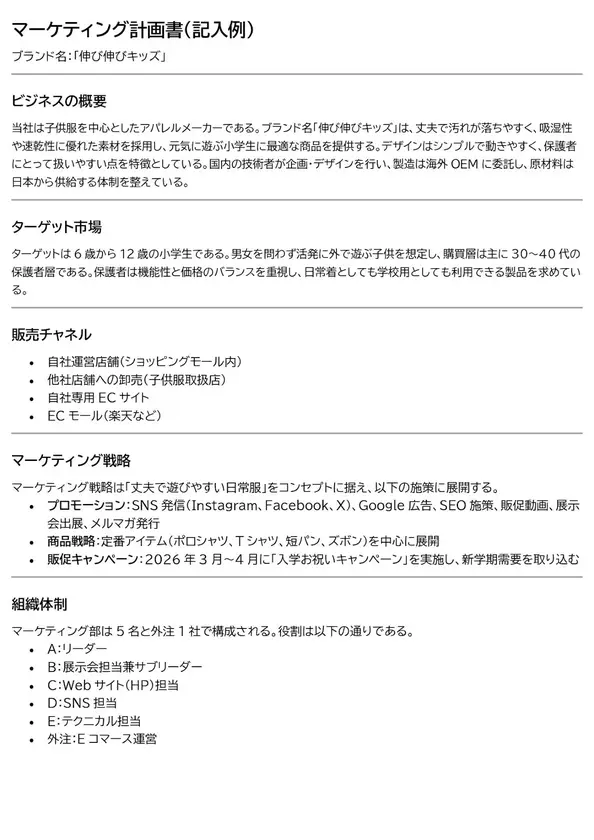
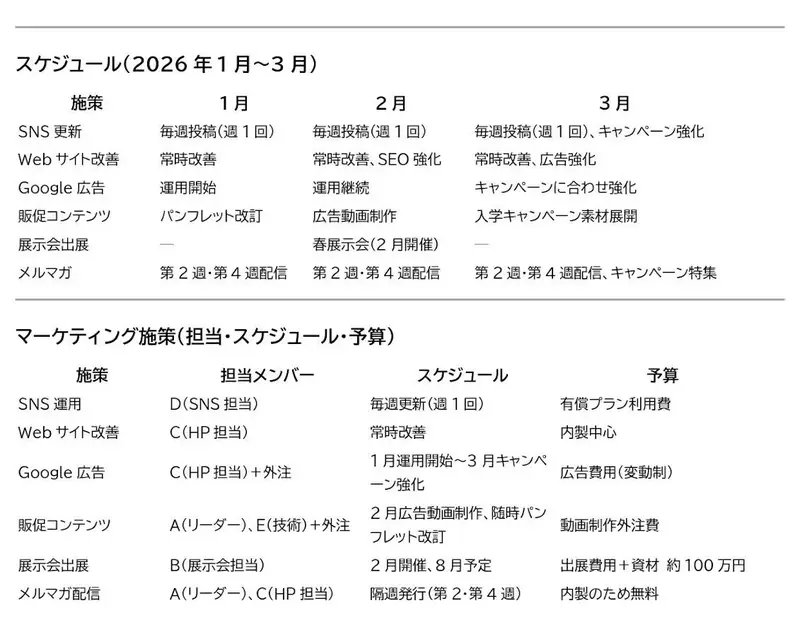
What is a marketing plan?
A marketing plan is a visual representation of the methods and procedures for executing marketing activities that a company will undertake to achieve its goals. It clarifies business objectives, market research, target audience, channels to be used, budget, and schedule, and serves as a practical guideline for achieving goals such as increasing sales and acquiring customers.
The difference between a marketing plan and a marketing strategy
The difference between a marketing plan and a marketing strategy lies in the fact that a marketing plan is a set of procedures for carrying out sales promotion and marketing activities, while a marketing strategy determines the direction of the business.
1. Develop a marketing strategy.
An effective marketing plan begins with developing a foundational strategy. Here, it's crucial to clearly define your company's objectives and positioning, and to determine "who," "what," and "how" you will deliver your message. Utilizing frameworks such as 3C analysis, SWOT analysis, and 4P analysis can help you understand your company's current situation, strengths, and weaknesses, enabling you to formulate an effective strategy.
2. Formulate KPIs in line with your marketing strategy.
Setting Key Performance Indicators (KPIs), which are numerical indicators used to measure progress, is essential for executing a marketing strategy. KPIs need to be specific and measurable, and ideally, they should also include criteria such as feasibility, relevance to the strategy, and deadlines. This allows for objective evaluation of results and clarifies directions for improvement.


