 跨境独立站开店
Introducing Campaign Autopilot: AI-powered marketing integrated into Shopify
Autopilot allows you to run AI-powered campaigns from your admin panel. Set your budget, approve what you want to launch, and learn from what works.

A new way to implement speculative marketing without agency fees. Now available in Early Access.
You already know the importance of marketing. However, deciding what to do and where to spend money requires either too much time on your end or an agency budget that cannot be justified.
The situation will change starting today.
Introducing Campaign Autopilot
Autopilot is a new way to run marketing that's built directly into your Shopify admin panel. It leverages AI to plan and execute your marketing across all channels—Meta, Shop, email, and more. This allows you to focus on what truly matters: your products, your brand, and your customers.
Your role is simple: just set the budget, add conditions, and approve the execution before it goes live. Autopilot handles everything else, including creating campaigns, allocating budgets to channels, and making continuous adjustments based on actual results.
Furthermore, no deposit or marketing degree is required.
Feature Overview
The process after turning on Autopilot is as follows:
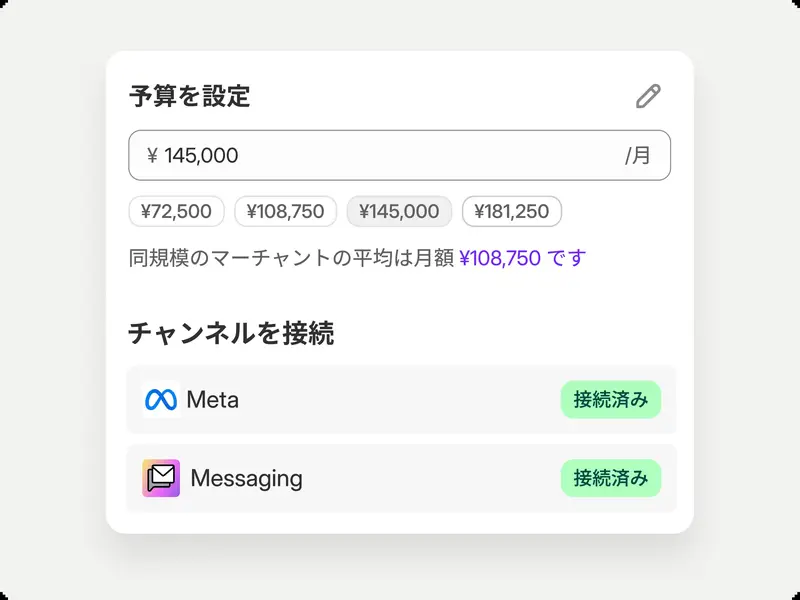
- Connect your channels. Autopilot helps you create new ad accounts on Meta and other platforms if you don't already have them, or connect existing ones. It also helps you set up email automation and run ad campaigns on relevant ad channels such as Shop, Pinterest, and ChatGPT.
- Set a realistic monthly budget. Autopilot distributes this budget across all connected channels. Once the budget is reached, the campaign will automatically pause.
- Set rules. You tell Autopilot what it can and cannot do. You can decide how much control you want, such as whether to require approval before each campaign runs or to give Autopilot more flexibility as the campaign evolves.
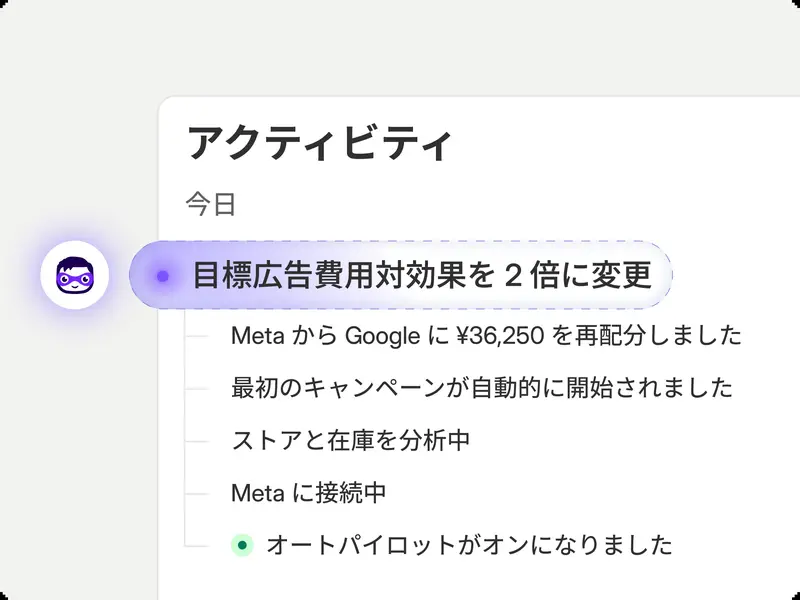
- Autopilot creates plans and puts them into action. It creates campaigns, allocates budgets to the areas with the highest potential, and starts running them. It adjusts if performance is poor. It notifies you if attention is needed.
- You remain in control. You can reject recommendations, change your budget, or pause at any time. Autopilot works for you, and not the other way around.
Turn on AutoPilot
Run campaigns across all major channels.
Autopilot supports a variety of marketing channels, with more to be added in the future.
- Meta Ads: Create a new ad account or connect an existing one to run ad campaigns across the Meta platform.
- Shop Campaigns: Run ads in your shop and on external service channels. Available in the United States and Canada.
- Shopify Messaging: Autopilot proposes and implements automated email notifications for issues such as cart abandonment and site exits.
Sidekick is always there to support you. You can ask Sidekick for growth recommendations, trigger Autopilot actions, and get a clear picture of your overall marketing landscape. It's available worldwide.
Channel availability varies by location, but eligible store owners can use email and paid advertising from day one.
Adopt different marketing modes.
Autopilot is not a new advertising platform to be layered on top of an already complex system. It's a completely different approach.
It sets everything up automatically. Starting an ad campaign shouldn't be a hurdle. Autopilot allows you to create meta ads and ad accounts directly from the management screen, so you can start running campaigns from scratch, even if you've never run ads before, all in one place.
Run across multiple channels together. Instead of managing Meta and email in separate tabs, Autopilot controls them all from one place. Shift your budget to where the best performing is and reduce the budget for where the worst performing is.
It gets smarter over time. Shopify understands what works for millions of stores, including which channels are driving orders, by category, region, and growth stage. Autopilot is based on real patterns gleaned from actual stores, not generic advice, so it provides recommendations that single-channel tools and typical agencies can't offer.
Learn together. Autopilot does more than just run marketing campaigns. It clearly shows what's working: which channels are driving orders, which products are popular, which are underperforming, and what steps are being taken to address them.
Instead of leaving campaign management to others, asking questions about the points that concern you most will allow you to gain a deeper understanding of the business.
This will not affect existing campaigns. If you are already running ads in Meta or Shop, Autopilot will create a separate campaign. Existing campaigns will remain unchanged.
Start with clear expectations.
Autopilot offers a new approach to marketing, but here's what it can and cannot do:
Specific results are not guaranteed. No marketing tool can honestly promise such things, but Autopilot constantly analyzes each channel to identify factors that drive store sales. It makes adjustments based on actual performance data, not assumptions.
It takes time to see results. Marketing, even when automated, doesn't produce instant results. Autopilot takes time to learn what works best for your business—which audiences respond, which channels lead to conversions, and which ads resonate with people.
Use images and branding. Autopilot creates campaigns using existing product images and catalogs. Since the AI doesn't create the creative content for you, you won't see anything that doesn't fit your store's image.
Early access has begun.
Autopilot is now available in early access. If your store is eligible, you can enable it in the new Growth tab in the admin panel. If you don't have access yet, sign up and you'll be notified when it becomes available.
Autopilot is available free of charge to all merchants with a paid Shopify plan. As before, advertising costs will be paid directly to Meta and other platforms, and Shop campaigns and emails will be paid through Shopify. There are no additional charges for Autopilot.
Navigate to the Growth tab in your admin panel and get started. No more worrying about which ad format to choose, which bidding strategy to use, or when to send the next email. Let Autopilot handle it.
Share this article
- Share on Facebook
- Share on X
- Share on LinkedIn


