 跨境独立站开店
Instagram's Shop Feature: How to Use Instagram Shopping
By mastering Instagram Shopping, Instagram's shop feature, you can generate sales for free without using advertising. This article will introduce how to use Instagram Shopping and how to link it with your Shopify store.






What is Instagram's shop feature?
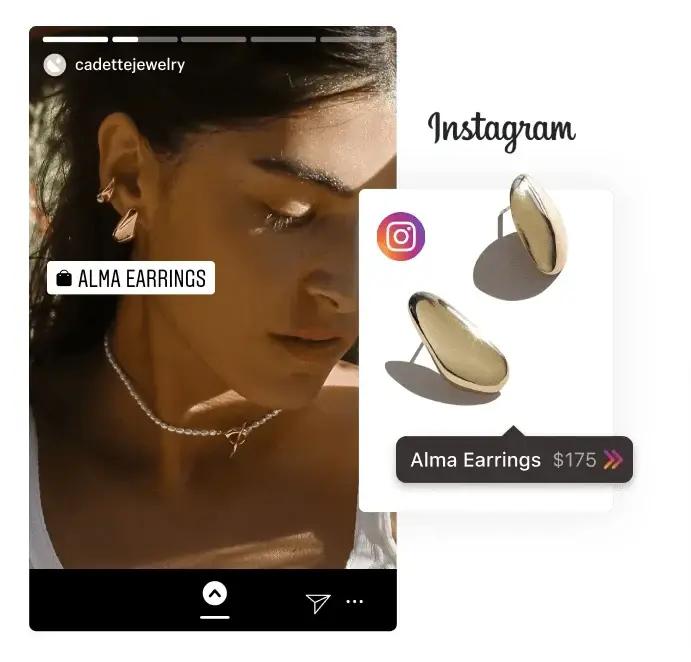
Instagram's shop feature allows users to purchase products directly from their posted photos and videos. Users can access product pages on e-commerce sites with just a few taps, making it easy to buy items they like. Additionally, a "View Shop" button on the profile screen displays a list of products, allowing users to be directed to related items.
The advantages of Instagram's shop feature
Instagram's shop feature is also effective for marketing. We'll explain in detail the features that can lead to business expansion.
Increased awareness can be expected.
As of December 2023, Instagram's monthly active users in Japan exceeded 66 million and are continuing to increase. Furthermore, its unique algorithm makes it easier to display posts tailored to individual interests, so by utilizing the shop function, you can accurately reach users who are likely to be interested in your products.
This can prevent customers from abandoning the purchase.
Even if a user becomes interested in a product after seeing an Instagram post, their willingness to purchase will decrease if they have to go through the trouble of accessing the e-commerce site and searching for the desired product. By allowing users to access the product page on the e-commerce site directly from the product image, it is expected that the drop-off point before purchase can be prevented.


