跨境独立站开店
What information should be included on a shipping label? Here are some helpful tips for creating one.
Learn tips for creating shipping labels. We'll show you what to include on your labels and how to print them easily for shipping.
Learn tips for creating shipping labels. We'll show you what to include on your labels and how to print them easily for shipping.
Shipping labels are a crucial element of the supply chain. Without correct information, packages may get stuck in transit or be delivered to the wrong address. Both are detrimental to customer trust and your business.
To provide customers with the best possible experience, it's crucial to include accurate information on shipping labels. This article will show you how to obtain shipping labels, how to create them by hand, and provide shipping label templates.
What is a shipping label?
Shipping labels are stickers affixed to each package that identify the destination, recipient, weight, and other important information. This allows for delivery from point A to point B when using delivery services such as Sagawa Express, Yamato Transport, and Japan Post.
The unique scannable barcode tracks the movement of your packages, clearly showing both you and your customers the shipping status of your products.
How to write a shipping label
- Sender's name and address
- Recipient name and address
- Total weight of the package
- Machine-readable code
- IMpb code
- Shipping method
- Sorting number
- Online tracking number
Shipping labels are not a place for creativity. They need to include essential details to ensure your package reaches its destination. The information you add to the label will vary depending on the type of package you're sending. For example, an envelope requires less information than a cardboard box.
Looking for fast fulfillment and shipping capabilities?
Shopify's new fulfillment features include streamlined shipping address verification and inventory-based order limits.
Addressing an envelope
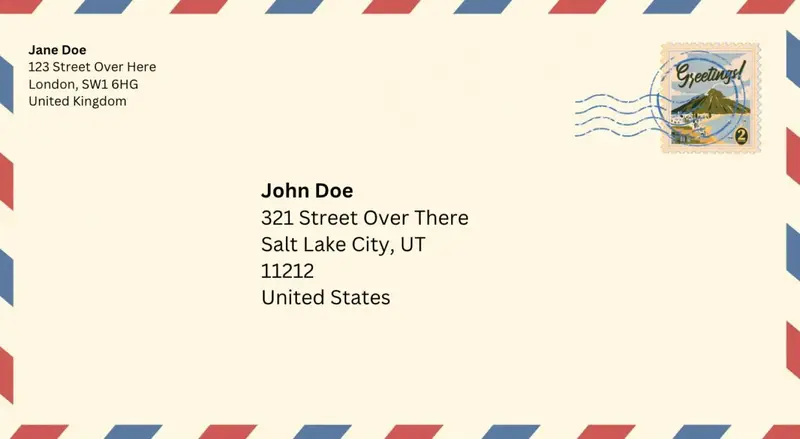
Attach the shipping label to the center of the envelope, and write the sender's address in the upper left corner. Including the sender's address is not mandatory, but it is helpful in case the package is damaged or undeliverable due to an incorrect address. In this case, the package will be returned to you without being lost.
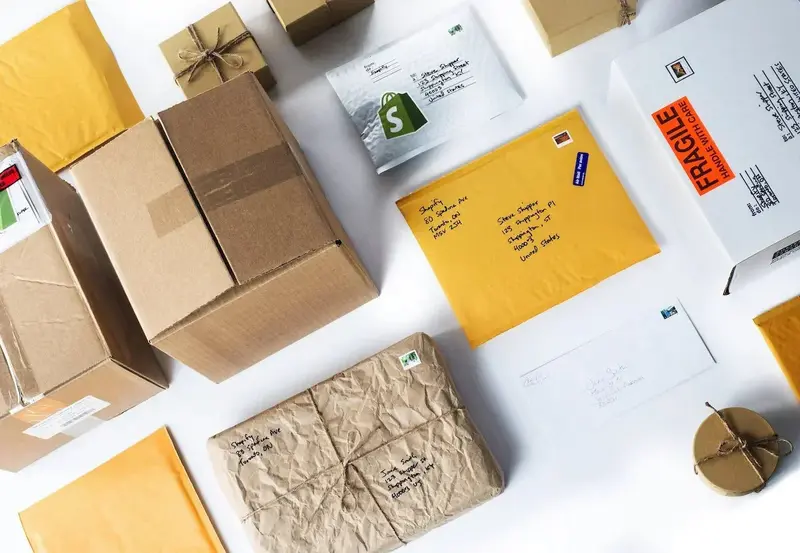
The image below shows an example of a package destined for overseas, but the information to be included on the shipping label can also be applied to deliveries within Japan.
- Recipient's name
- Recipient's company name
- Recipient's address (including room number if applicable)
- Sender's postal code, prefecture, and city/ward/town/village (listed on the same line)
- (If necessary) Country name
Once you attach a stamp to the upper right corner, the package is ready to ship.
Write the shipping label on the box.
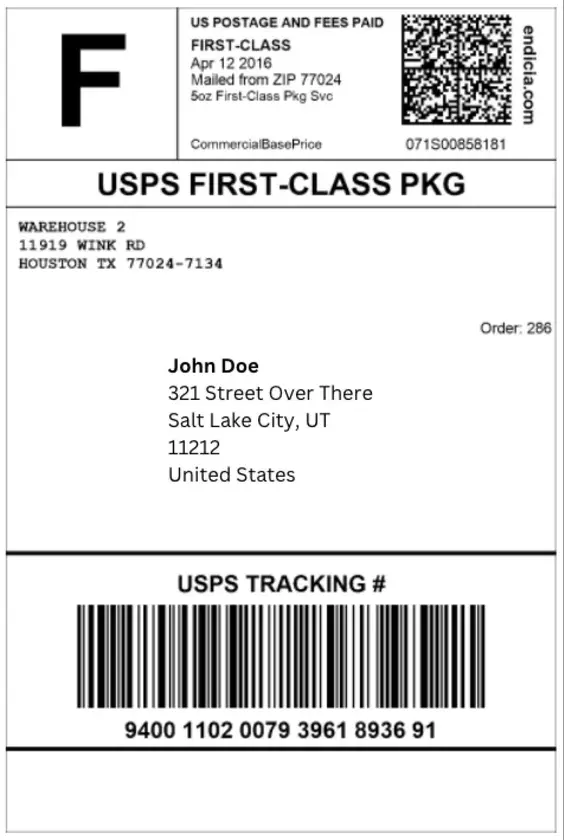
The shipping label on the box needs a little more information. The label should be placed in the center of the largest surface of the package and include the following information:
- Shipping method (e.g., express mail or priority delivery)
- Sender's name and address
- Recipient's name and delivery address
- Package weight
- Scannable barcode for tracking packages during transit
How to create a shipping label
Shopify shipping
Shopify shipping allows you to obtain shipping labels from popular carriers such as UPS and DHL Express (see the full list of carriers here).
If your fulfillment location is eligible for Shopify shipping, you can purchase shipping labels when fulfilling orders. Shipping labels can be purchased individually or in bulk, and you can also create return labels.
Here's how to purchase shipping labels through Shopify Shipping:
You can integrate shipping labels with custom forms and invoices, and print them in bulk to save time and shipping costs. However, you will need a desktop printer or a Shopify-compatible label printer to print shipping documents.
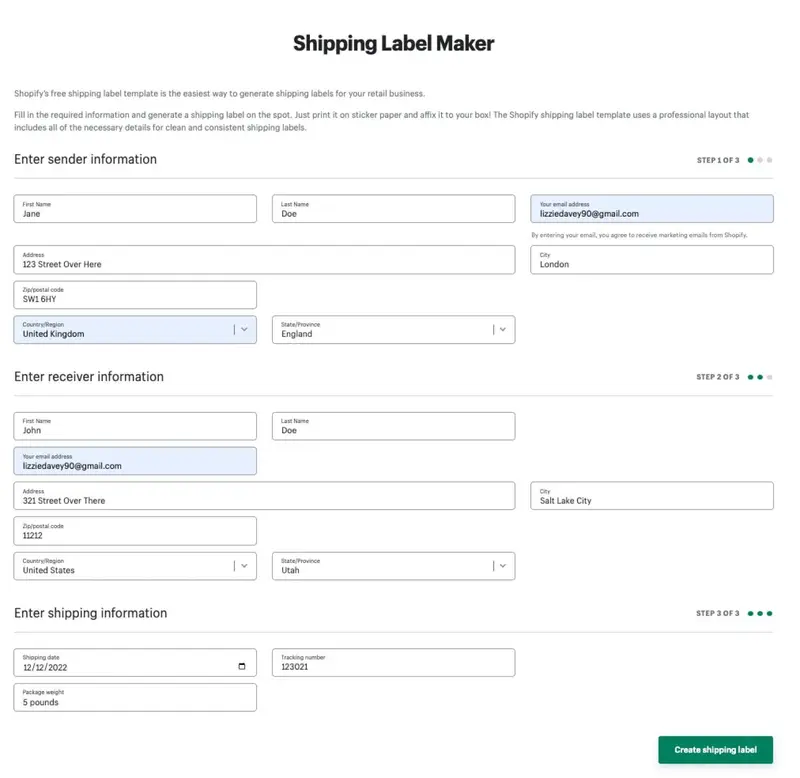
How to handwrite labels on packages using Shopify
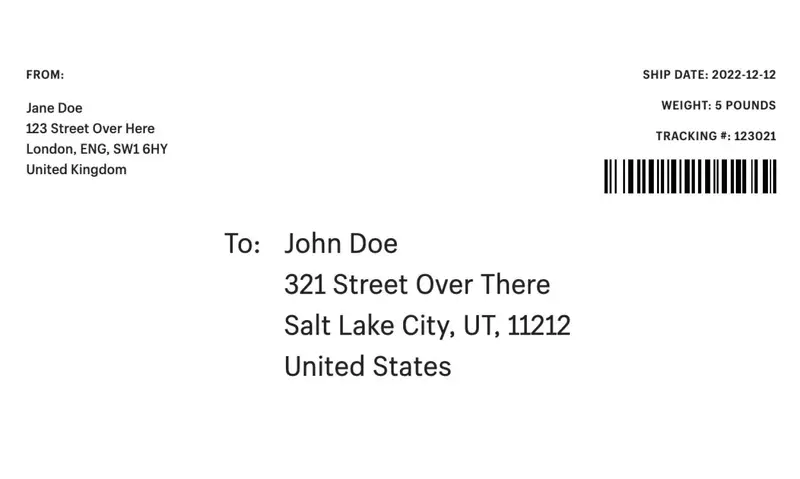
Shopify's shipping label templates make creating individual labels easy. First, prepare the following information:
- Recipient name and delivery address
- tracking number
Enter this information and click "Create shipping label".
The labels will be sent via email or can be accessed from your Shopify dashboard.
The finished label will look like this:
Print the shipping label, attach it to the appropriate package, and you're ready to go! Let's ship your package!
Delivery company
You can also generate shipping labels through your chosen shipping carrier's website, kiosk, or branch office. This must be done manually and bulk label creation is not possible, but it's convenient for one-time purchases or shipping only a few items per month.
Visit the shipping carrier's website, find a shipping label template, download the file, and print it. Here is a list of major shipping carriers and their shipping label templates:
- FedEx
- USPS
- eBay shipping
How to write a shipping label: Tips for success
Now that you know how to fill out shipping labels, here are some ways to streamline your shipping strategy and ensure your packages arrive in the right place at the right time.
1. Add special instructions.
Are the contents of your package fragile? Do they contain food or other perishable items? If so, be sure to mention this on the shipping label. This will ensure that the delivery company handles your package with extra care and that it arrives in perfect condition.
2. Include the detailed statement.
The invoice (or "shipping label") is included inside the package. It must include contact information, recipient's address, order date, tracking number, and names of items in the package. You can use Shopify shipping to generate and print the invoice at the same time as the shipping label.
3. Use the label as a "This way up" marker.
To indicate the orientation of the package, attach the shipping label to the top of the box. This ensures that the package does not shake and is handled as carefully as possible.
4. Clearly define the shipping label.
Attach the shipping label to the flat side of the package and avoid folding it over the edge. Doing so may obscure important information and invalidate the tracking barcode.
Shipping labels are crucial for everyone involved in the fulfillment process. They allow you and your customers to know where your goods are in the shipping process, helping to ensure packages reach the right recipient quickly.
Frequently Asked Questions about Creating Shipping Labels
How should I fill out the shipping label?
On the shipping label, fill in the recipient's name and address, the sender's address, the tracking code, and the package weight.
Is it enough to just write the address on the package?
To ensure your package reaches the recipient smoothly, the shipping label must include the customer's name and address, the sender's address, the tracking code, and the package weight.
Do I need to print the shipping label, or can I handwrite it?
While shipping labels can be handwritten, most carriers require a tracking code, which must be generated digitally. To ensure your package arrives quickly, it should include the recipient's name and address, the sender's address, the tracking code, and the package's weight.
Share this article
- Share on Facebook
- Share on X
- Share on LinkedIn