跨境独立站开店
Automating Dropshipping: Tools and Implementation Methods Explained
This article explains the benefits, mechanisms, useful tools, and implementation methods of automating dropshipping.
This article explains the benefits, mechanisms, useful tools, and implementation methods of automating dropshipping.
Dropshipping is a popular way to start an e-commerce business because it allows you to sell products without holding inventory and have them shipped directly from the supplier to the buyer. In recent years, various tools have made it possible to automate a wide range of dropshipping tasks, including product registration, inventory synchronization, order processing, shipping tracking, and customer support.
Automating dropshipping by integrating e-commerce stores and suppliers with tools allows for efficient handling of inventory synchronization, order distribution, and tracking number updates. To enhance competitiveness, it's crucial not only to increase the number of products offered but also to process orders quickly and accurately from order to delivery.
This automation reduces the time and cost spent on daily operations, allowing you to dedicate more time to marketing, business development, and customer service. This article explains what dropshipping automation is, its advantages and disadvantages, the main automation tools, and how to automate the operation of your e-commerce site.
How to automate dropshipping
Dropshipping automation is a system where inventory management, order processing, and other tasks are outsourced to suppliers, and much of the work is streamlined through the integration of automation tools and software.
Instead of manually sending and confirming order information, picking products, and packing them, you can use tools to automate a series of tasks. In other words, you can reduce the manual work required for daily operations according to the rules and integrations you set up.
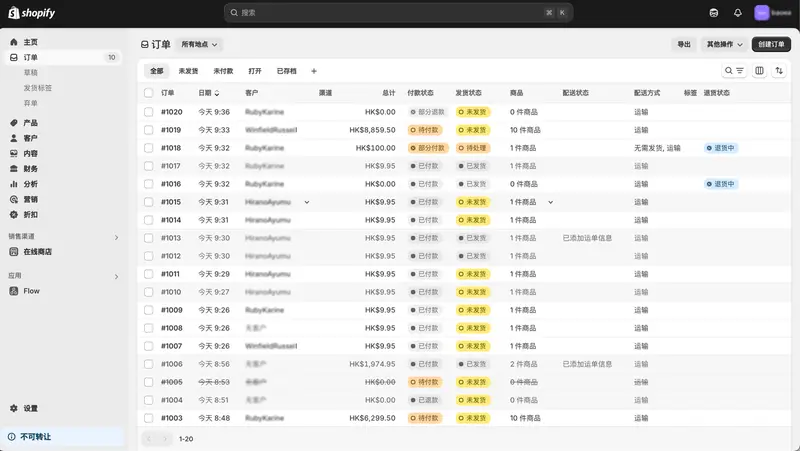
For example, when a customer purchases an item from an online store, the order information is automatically sent to the supplier. The supplier packs the item and ships it to the customer, and once a tracking number is issued, that information is automatically reflected in the store's system and notified to the customer.
The dropshipping market is expected to continue growing, and the retail industry is increasingly interested in using AI and automation to streamline supply chains. As a result, automation tools are becoming more than just convenient features; they are becoming crucial mechanisms that prevent lost sales opportunities and lead to faster deliveries and improved customer experiences.
Advantages and disadvantages of automating dropshipping
Benefits of automating dropshipping
- Improved efficiency
- Improved accuracy
- Reduction of initial costs
- Cost reduction
A major benefit of automation is improved operational efficiency. Manual tasks such as verification, approval, and communication can be reduced, and these processes can be entrusted to automated tools. By setting rules in advance, the system will proceed according to those rules, reducing waiting times at each stage of the business process.
As the number of orders increases, so does the workload for tasks such as contacting suppliers, checking inventory, and updating tracking numbers. Automating these repetitive tasks allows businesses to dedicate more time to activities that contribute to increased sales, such as product selection, advertising, and store improvements.
Accurate data is crucial when making business decisions. Inaccurate data can lead to mistakes that result in losses. Automating processes reduces human errors such as manual data entry mistakes and processing omissions, thereby improving data accuracy. This, in turn, enables better decision-making.
In dropshipping, incorrect address entry, discrepancies in inventory levels, delayed price updates, and failure to include tracking numbers can lead to refunds and decreased customer satisfaction. The ability to mitigate these risks through automation is a significant advantage.
A major advantage of dropshipping is that you don't need to purchase and hold inventory of the products you sell in advance. The supplier handles product storage and shipping, so the seller doesn't have to do it themselves. Furthermore, since you only purchase products after receiving an order from a customer, you don't need capital to buy large amounts of inventory beforehand.
Traditional retail involves significant initial costs for inventory purchase, warehouse contracts, packaging staff, and delivery systems. Dropshipping reduces these burdens, and by combining it with automation tools, it's possible to build a system that can be operated efficiently with a small number of people.
Automating dropshipping can lead to cost savings in many ways. It reduces the risk of losses due to data inaccuracies and human errors, shortens processing times, and reduces the human resources required for operations. This lowers operating costs, making it easier to allocate funds to marketing, business expansion, and other areas.
For example, if staff manually sort orders and reconcile inventory every day, labor costs tend to increase as sales grow. By utilizing automation tools, it may be possible to handle increased workloads without hiring additional personnel, which helps maintain profit margins.
Disadvantages of automating dropshipping
- Low profit margin
- Technical knowledge is required.
- The scope of control is limited.
- Reduced flexibility in individualized responses
While it's possible to make a profit from dropshipping, it requires an effective business strategy. Generally, profit margins tend to be lower compared to developing and selling products in-house. Automating dropshipping allows you to outsource complex tasks to tools and suppliers, but this comes at the cost of doing so. Therefore, you may need to sell a large volume of products to ensure sufficient profits.
After deducting app usage fees, supplier fees, advertising costs, payment processing fees, and return handling fees, the final profit may be smaller than expected. Careful management of pricing and advertising costs is crucial.
Automating dropshipping requires an understanding of how to use digital tools and systems. It's not just about choosing the right platform; continuous maintenance and updates are also necessary. Therefore, those with limited technical knowledge and experience may find implementation and operation challenging.
Automation requires selecting apps, connecting to app stores, setting rules for automating tasks, and checking for errors. It's a good idea to start by automating a small number of tasks and then expand the scope once you're comfortable with the process.
In dropshipping, sellers have limited control over product management and shipping because these tasks are outsourced to suppliers. Some suppliers may also have restrictions on order customization and branding. Furthermore, sellers face the challenge of not being able to directly prevent errors that occur on the supplier's end.
Product quality, packaging, shipping speed, included items, and the customer experience upon opening the package all significantly impact brand image. However, with dropshipping, much of this is left to the supplier. Supplier reliability and delivery delays are critical risks that directly affect customer satisfaction.
Furthermore, with systems that automatically send order information to suppliers and automatically update tracking information, there is a possibility of overlooking stock shortages or price synchronization errors. Since problems may only become apparent through customer inquiries, regular checks are essential.
In dropshipping, where product procurement and shipping are outsourced, it can be difficult to respond to special customer requests or develop unique products. Furthermore, fully automating operations may lead to a lack of flexibility in handling exceptional situations, as processes proceed without human review or judgment.
For example, the availability of personalization, gift wrapping, handwritten messages, expedited shipping, and specified delivery dates will depend on the supplier's capabilities. If you want to meticulously design the brand experience, you should consider not only dropshipping but also using in-house inventory management or external logistics services (3PL) in conjunction with it.
Types of dropshipping automation tools
Before choosing an automation tool, clarifying which tasks you want to automate will make it easier to select a tool that suits your company. Dropshipping automation tools are primarily used for the following tasks:
Tools to automate product procurement
Product procurement tools link store and supplier databases, allowing for easy import of product information, images, descriptions, inventory data, and pricing. This is useful for quickly test-marketing new products or for handling products from multiple suppliers.
Popular tools include Shopify Collective, Syncee, DropCommerce, Spocket, and DSers. Each tool differs in terms of supported regions, shipping speed, supplier screening criteria, and the ability to issue branded invoices.
A tool to automate order processing and delivery.
Order processing automation tools automate tasks such as routing customer orders to the appropriate suppliers, setting shipping methods, and updating tracking information. They are particularly effective when using multiple shipping companies or suppliers, as they reduce the need for manual verification.
Tools that can help automate shipping and delivery operations include ShipStation, ShipBob, and AfterShip. For dropshipping businesses, automating post-purchase notifications and providing pages where customers can check the delivery status can lead to a reduction in inquiries and an increase in customer satisfaction.
Tools to automate inventory management
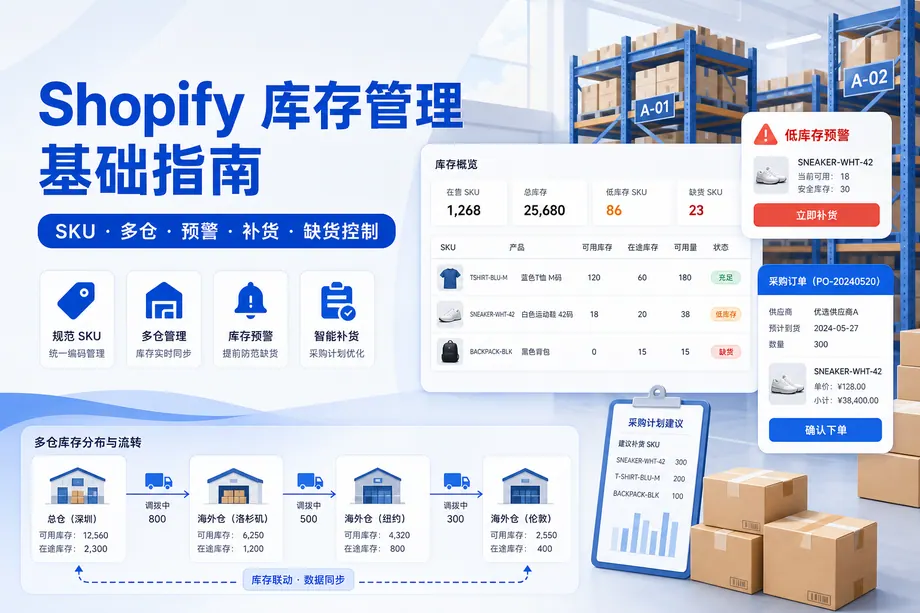
In dropshipping, the supplier's inventory status directly impacts the number of items available for sale in your store. If a supplier runs out of stock, you cannot ship orders even if you accept them. Therefore, inventory synchronization and automatic notifications when stock levels are low are crucial.
In a hybrid business model where best-selling products are managed in-house and everything else is sold via dropshipping, inventory management tools become even more crucial. Utilizing tools like Shopify's inventory management features, Shopify Flow, Inventory Planner by Sage, and Fabrikatör makes it easier to manage ordering, inventory transfers, low-stock notifications, and demand forecasting.
Tools to automate marketing
Marketing automation tools can be used to encourage first-time customers to make purchases and increase repeat purchase rates. They can automate tasks such as abandoned cart emails, post-purchase follow-up, encouraging repeat purchases, and sending emails to customers who haven't made a purchase in a while.
Tools like Klaviyo and Omnisend support automated delivery via email, SMS, and web push notifications. Since dropshipping often has lower profit margins, mechanisms to encourage repeat purchases are especially important.
Tools to automate customer service
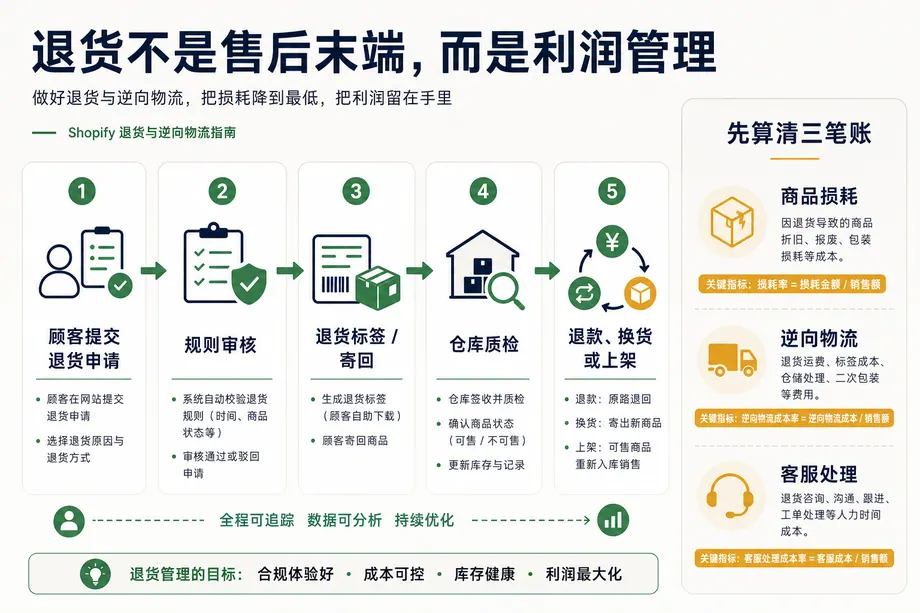
In dropshipping, the store handles customer service, while the supplier is responsible for managing and shipping the products. This makes it more likely that inquiries regarding delivery status, returns, exchanges, and delivery delays will occur.
Customer support tools like Shopify Inbox and Gorgias allow you to handle inquiries while reviewing order history and automate answers to frequently asked questions. For individuals or small teams, these tools can significantly reduce the burden of customer support.
How to automate a dropshipping store
Here are the steps to automate and streamline the operations of your dropshipping store:
1. Search for dropshipping automation tools in the Shopify App Store.
Shopify allows you to build an online store that supports dropshipping and automate operational tasks using a variety of tools.
First, set up your online store and install a dropshipping automation app that suits your needs. The Shopify App Store offers many automation tools that allow you to manage everything from product listing to order processing in one place. Here are some examples:
- AutoDS (English): This app allows you to search for products from sites like AliExpress, Amazon, and Alibaba and register them in your store. It can also automate order processing and tracking number updates. Find and import products. This app automatically processes orders and updates tracking numbers.
- Dropified: Automatically sends customer and order information from your Shopify store to your suppliers.
- Duoplane is a tool that automates order processing by collaborating with multiple suppliers. It streamlines order distribution and other processes, helping businesses focus on growth.
- Ordoro (English): Allows you to automatically distribute dropshipping orders to suppliers and split orders for processing.
In addition, there are tools like AI Dropship that allow you to partner with approved US and EU suppliers and automate inventory synchronization and order processing. Compare the product categories you handle, shipping regions, supplier quality, and monthly fees to choose the right one for you.
2. Streamline order processing with suppliers.
One of the tasks in dropshipping that benefits most from automation is order processing.
When a customer orders an item from the online store, the order information is automatically sent to the supplier via the app. This allows the supplier to quickly confirm the order and prepare it for shipment.
Some platforms can integrate with multiple suppliers and automatically distribute orders based on inventory levels. For example, orders can be automated based on which suppliers carry the product and whether or not they have it in stock.
Automating order processing reduces delays caused by manual processing and speeds up product delivery to customers.
Additionally, some stores combine dropshipping products with products sourced directly by the store. In this case, Shopify Flow allows you to set up rules to automatically route dropshipping orders to the appropriate suppliers and other product orders to your own warehouse or an external logistics service (3PL).
3. Synchronize inventory information across sales channels.
Automating dropshipping allows you to synchronize inventory information across multiple sales channels and suppliers, making it easier to understand accurate inventory levels. This reduces the risk of losses due to stockouts or excess inventory.
In dropshipping, the supplier's inventory levels affect the quantity you can sell in your own store. Continuing to sell items that are out of stock on the supplier's end can lead to order cancellations, refunds, and increased customer service burdens.
The aforementioned Duoplane app has an inventory data integration function that allows you to check the inventory status of each supplier. This allows you to understand the inventory levels of each supplier and allocate orders according to their inventory status.
Product sourcing apps like Syncee, Spocket, and DSers can also be used to import supplier inventory information into your store and automatically update it. If you work with multiple suppliers, be sure to check the frequency and accuracy of their inventory synchronization.
4. Optimize pricing to match your business model.
Dropshipping allows you to automate the updating, synchronization, and optimization of product prices. For example, the Dropified app has a feature that automates pricing, adding a certain profit margin to the cost price.
When automating pricing, it's crucial to establish rules to ensure profitability. Be careful not to set prices so low that you don't make a profit, or so high that customers hesitate to buy.
When setting pricing rules, please check the following points:
- Tiered markup: Set different markup rates for low-priced and high-priced items. For low-priced items, a higher markup rate may be necessary to ensure profitability.
- Minimum profit margin: A minimum profit margin is set to ensure that a profit remains even after deducting advertising costs, payment processing fees, and return shipping costs.
- Supplier pricing rules: Some suppliers have a minimum advertised price (MAP). Be aware that violating this may affect the terms of the transaction.
- Psychological pricing: For example, instead of "2,000 yen," you can automatically adjust the price to make it seem more appealing to customers, such as "1,980 yen."
5. Automatically update the delivery status of orders.
Providing delivery status notifications is an essential element for improving the customer experience. It is important to inform customers about the shipping status and estimated delivery date of their orders. Even if there are no changes in the delivery status, sending email notifications in advance about order confirmation and shipping schedules will help reassure customers.
Automating updates on shipping status and customer notifications improves the customer experience. Furthermore, sellers can receive shipping status updates, allowing them to identify and address issues such as delays early.
AutoDS allows you to automatically import tracking numbers provided by suppliers into your Shopify store. Duoplane can also automatically import and update shipping information from suppliers. By utilizing these features, you can check the shipping status of each order in one place.
Shopify allows you to automate customer notifications using tracking numbers from major shipping companies. You can also leverage shipping tracking within the Shop app, reducing customer anxiety after purchase and lowering the number of inquiries.
Key points to consider when choosing automation tools
When choosing a dropshipping automation tool, it's crucial to select one that aligns with your company's specific challenges and needs. Even highly functional tools can increase implementation and operational costs if they don't suit your business scale and operating methods.
When comparing tools, check the following points:
You don't need to automate everything from the start. Begin with tasks where errors or delays can easily impact sales, such as order processing, inventory synchronization, and delivery status notifications, for a smoother implementation.
Frequently Asked Questions about Automating Dropshipping
How does automated dropshipping work?
Automated dropshipping is a system that connects online stores and suppliers using tools. When a customer places an order, the order information is automatically sent to the supplier, who then ships the goods directly to the customer.
What are the benefits of automating dropshipping?
Automating dropshipping offers numerous benefits, including reduced operating costs, more efficient inventory management, fewer shipping errors, and more time dedicated to marketing and customer service.
Is automated dropshipping suitable for beginners?
Automating dropshipping is suitable for beginners. It streamlines tasks such as order processing and inventory management, reducing the burden of starting an e-commerce business. However, you will need to understand app setup, pricing rules, supplier selection, and customer service procedures.
What is a fully automated dropshipping store?
A fully automated dropshipping store is an online store that automates most of the tasks that are typically done by humans, such as order processing, inventory management, and customer service, using tools and systems to minimize manual work.
What are the costs of automating dropshipping?
The cost of automation varies depending on the apps used for product procurement, order processing, marketing, customer service, and other functions. Some apps offer free plans, while others use a pay-as-you-go model, and costs may increase as sales and shipments grow.
For small-scale operations, it may be possible to start with just a few thousand yen per month, but using multiple paid apps can easily cost tens of thousands of yen per month. In addition to fixed costs, be sure to check the fees charged per order.
How do you determine the return on investment (ROI) from automating dropshipping?
To determine the return on investment, check whether the benefits of automation, such as reduced work time, fewer errors, and increased sales, outweigh the costs of implementing and operating the app. Since dropshipping tends to have lower profit margins, reducing misdeliveries, sales of out-of-stock items, and failures to update tracking information also contributes to securing profits.
Before implementation, recording current working hours, number of inquiries, cancellation rate, and refund rate will make it easier to compare the effects after automation.
Is using AI for dropshipping legal?
Yes, AI-powered dropshipping is legal. Using AI for tasks such as product research, pricing optimization, and customer service is accepted in major e-commerce markets.
However, when operating a business, you will need to go through procedures such as business registration and tax filing as necessary. Also, if you are dealing with branded products, make sure you have the necessary rights and permits for sales.
Share this article
- Share on Facebook
- Share on X
- Share on LinkedIn