跨境独立站开店
What is Amazon dropshipping? Fees and how to get started.
Amazon dropshipping is a sales method that allows you to sell products on Amazon without holding any inventory. This article will introduce the features of Amazon dropshipping and how to start a dropshipping business on Amazon.





This article introduces the features of Amazon dropshipping and how to start a dropshipping business on Amazon.
Dropshipping is a system where, when an order is placed through an online shop, the manufacturer or wholesaler ships the product directly to the customer. Because sellers don't need to hold inventory, they can start a business with low risk and minimal initial costs.
There are several ways to start dropshipping, but using Amazon, which has a large user base, is recommended as it makes it easier to reach your target audience.
This article explains the basics of Amazon dropshipping, including fees and how to get started.
What is Amazon dropshipping?
Amazon dropshipping is a business model that allows you to sell products on Amazon without holding any inventory; it is a type of dropshipping.
Sellers can start selling on Amazon without purchasing inventory by creating a seller account and listing their products. When a customer places an order, the seller forwards the order to a dropshipper (a supplier such as a dropshipping company, manufacturer, or wholesaler), who then ships the product directly to the customer.
Normally, inventory management and shipping procedures are costly and time-consuming tasks for sellers, but by using Amazon Dropshipping, the dropshipper handles tasks such as packaging, shipping, and warehousing, making it easy to sell products from anywhere in the country.
On the other hand, a disadvantage is that competition is fierce, and fees are charged by Amazon and other vendors, making it difficult to secure significant profits.
Amazon dropshipping fees
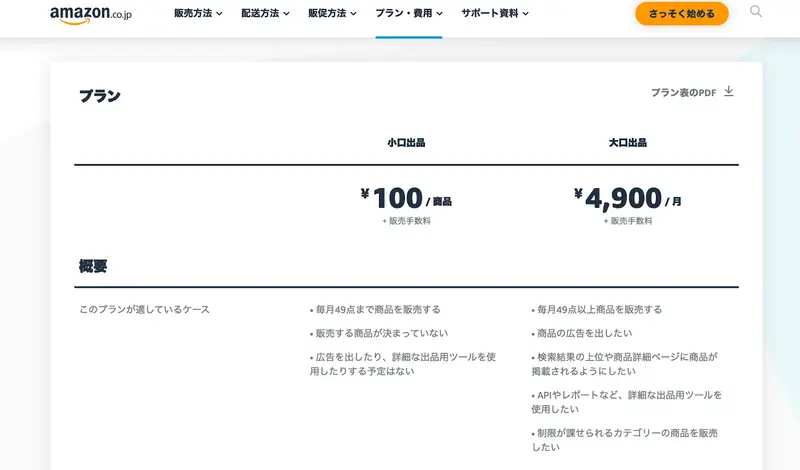
There are five types of fees for Amazon dropshipping. Monthly subscription fees vary depending on the plan, and the number of items you can sell per month, fees, and available tools differ depending on whether you choose the Professional or Individual selling plan.
- Monthly registration fee: Professional seller plan: ¥4,900 per month, Individual seller plan: ¥100 per item
- Sales commission: 15%
- Basic transaction fee: Large-volume seller plan: No basic transaction fee; Small-volume seller plan: 100 yen per item.
- Category closing fee: 80-140 yen
- Shipping Fees: For the Professional Seller Plan, you can set your own shipping fees. For the Individual Seller Plan, in addition to the above fees based on Amazon's terms and conditions, there may also be fees for bulk listings and refunds.
Is Amazon dropshipping profitable?
Amazon dropshipping has lower profit margins compared to direct selling, but it can be profitable depending on the product selection.
When looking for products to sell through Amazon dropshipping, you should focus on those with high demand and little competition. Due to its low barrier to entry, Amazon dropshipping often leads to fierce competition among sellers offering the same products. Since you need to sell a large volume to make a profit with low margins, start by finding products with high demand.
Even better are products with little competition that won't lead to price wars. With dropshipping, you outsource sourcing and shipping, so there are limits to how much you can lower those costs. Products whose prices aren't affected by competition are ideal for dropshipping.
It's also effective to add value to your store beyond price, such as carefully selecting products throughout the store or enhancing services like special offers.
6 Steps to Getting Started with Amazon Dropshipping
- Select a listing plan
- Find a dropshipper
- Create an Amazon account
- Register a product
- Attract customers
- Integrate with Shopify (optional)
1. Select a listing plan.
First, consider your listing plan. There are two types of listing plans: individual seller and professional seller. Each plan differs in terms of the number of items you can sell per month, fees, available tools, and types of products you can list.
Each plan is suitable in the following situations:
- I want to list more than 49 items every month.
- I want to advertise my product.
- I want to rank higher in search results.
- I want to use a listing tool.
- There are plans to sell in restricted categories.
- I only plan to list up to 49 items per month.
- No plans to use advertising or tools.
- The products to be sold have not yet been decided.
If you want to use advertising, promotion, and analytics tools, a professional seller plan is recommended. Some product categories can only be listed with a professional plan, so be sure to check the official website before starting to sell on Amazon.
2. Find a dropshipper
You can either contract directly with manufacturers or wholesalers, or find and contract with a dropshipping provider (DSP). In the dropshipping business, supplier selection is a crucial factor that can determine success or failure. Providing low-quality service can lead to decreased customer satisfaction.
At this time, it is important to confirm that no names other than the seller's can be found on the packaging boxes or delivery slips. Make sure to contract with dropshippers who not only provide high-quality products and e-commerce fulfillment services, but also comply with Amazon's dropshipping policy.
3. Create an Amazon account
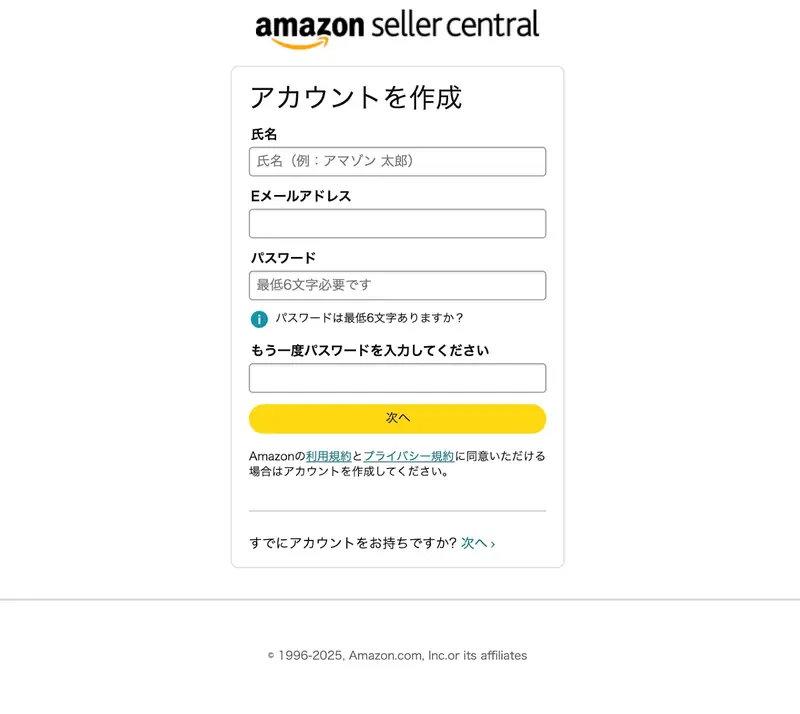
You will create an account to sell on Amazon. You can use an existing account that you normally use for shopping, or you can create a new account for selling using a business email address. The required information is as follows:
- Identification document (such as a driver's license)
- Transaction statement issued by a bank or credit card company (within the last 180 days)
- telephone number
- credit card
- Bank account number (for receiving sales payments)
When creating an Amazon account, you are required to undergo a review under the Installment Sales Act. This is a review process to become eligible to use the credit payment service. The review takes about 10 days, and you cannot list products until the review is complete.
4. Register the product.
We will register the following product information on Amazon.
- Product Code: Industry standard codes such as UPC, ISBN, and JAN.
- SKU: Product identification number set by the seller
- Listing information: Price, shipping options, etc.
- Product details: Brand, category, etc.
- Keywords: For buyer search
Next, add the title, images, variations, and recommended items to the "product details page."
However, the criteria for items that can be listed vary depending on the type of product, brand, and plan. For example, only new clothing and shoes can be listed. There are also restrictions on certain categories, such as alcohol, animals, pharmaceuticals, and food products, so be sure to check carefully before listing.
Additionally, for certain product categories such as jewelry, music, and videos/DVDs/Blu-rays, listing permission is required during product registration. You can check whether listing permission is required by searching during the product registration process.
5. Attract customers
After listing your product, you should start advertising and marketing. Amazon recommends the following methods for attracting customers:
- Using advertising: You can advertise your products as a sponsor using Amazon Ads.
- Enhance your photos and text: Make your product title, images, and descriptions appealing.
- Proper categorization: Check the scope and hierarchy of each category to ensure you can reach customers who search for products by category.
Furthermore, conducting social media marketing on platforms like Instagram and Facebook is also an effective strategy.
6. Integrate with Shopify (optional)
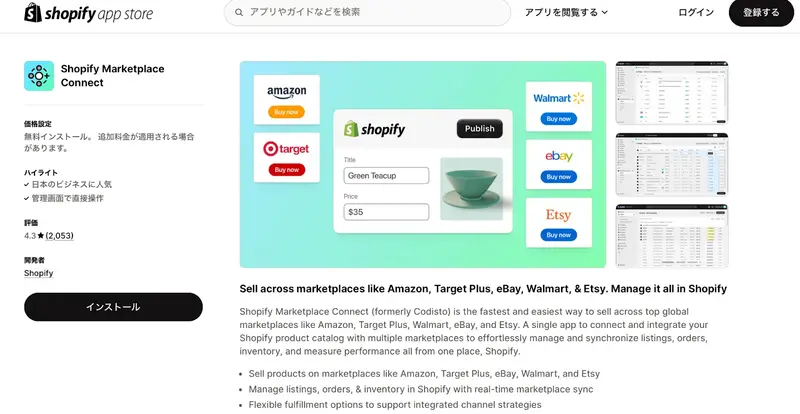
If you already have a Shopify store, you can link it with your Amazon account to centralize product and inventory management. An app is required for this integration, so download the Amazon integration app from the Shopify Appstore. Below are some examples of apps that can integrate your Shopify store with your Amazon account.
- Shopify Marketplace Connect (English): Free to use, with excellent support.
- CedCommerce Amazon Channel (English): Allows you to manage multiple Amazon channels.
- Amazon Importer Spreadr App (English): An intuitive management interface.
Amazon Dropshipping Policy
To use dropshipping on Amazon, you must meet the requirements of Amazon's dropshipping policy. If you use third-party fulfillment services (FBA), third-party logistics companies, or dropping service providers, please note the following:
- The company must have a contract with its supplier that designates it as the record seller of the goods.
- Remove any seller information other than your own from the delivery slip or invoice before shipping the ordered goods.
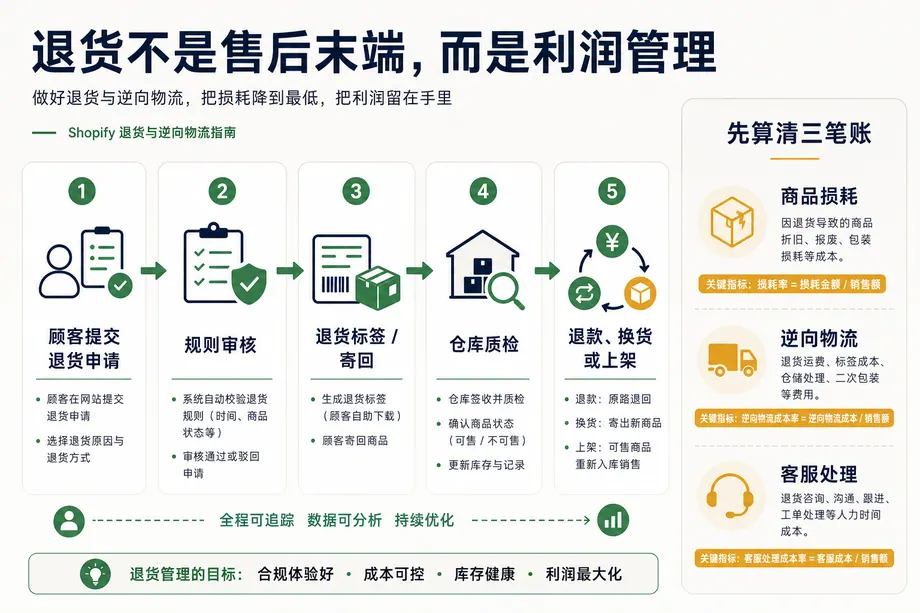
- The company is responsible for accepting and processing returns of products from customers.
- You must comply with the Business Solutions Agreement (BSA) and Amazon policies.
Furthermore, it is prohibited to list a different name on the shipped package or delivery slip than the seller's name, as this can confuse the buyer. The following are examples of violations of the terms and conditions.
- When purchasing a product from a third party and listing it for sale, it is not clearly stated at the time of shipment that the seller is the registered seller.
- If the delivery slip, invoice, outer packaging, or other location contains a name or contact information other than that of the seller
The difference between Amazon FBA and Amazon Dropshipping
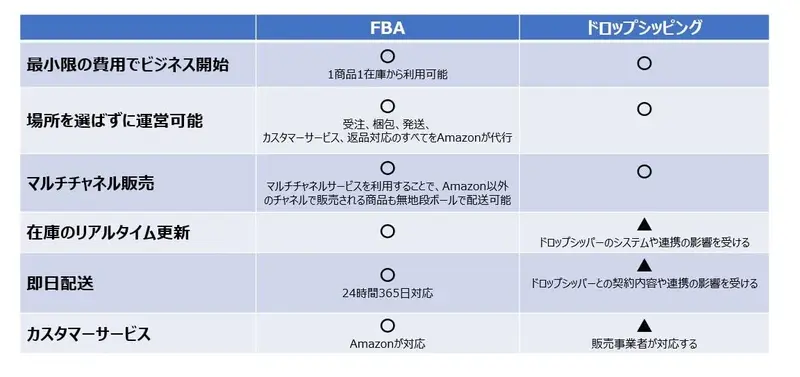
The difference between Amazon FBA (Fulfillment by Amazon) and Amazon Dropshipping lies in the type of service provider that sellers entrust with managing the delivery of their products.
With Amazon FBA, you entrust product management and shipping to Amazon, while with Amazon Dropshipping, you entrust product management and shipping to suppliers or dropshippers. The choice between FBA and Amazon will result in differences in inventory tracking, delivery speed, customer service, and costs.
One of the advantages of Amazon FBA is that you can track your inventory in real time, and Amazon handles returns and customer service, providing peace of mind. Optional services like Subscribe & Save and international shipping are also available, making it an effective tool for expanding your business. However, fees such as inventory storage fees and fulfillment fees are added depending on the products and quantities you sell, so it's a good idea to get an estimate using the Amazon fee calculator.
With Amazon dropshipping, inventory availability, delivery times, and fees vary significantly depending on the contract with the dropshipper. Returns and customer service are also handled by the seller.
For sellers unfamiliar with dropshipping, Amazon FBA can be a good alternative.
Amazon dropshipping can be started with low risk without holding inventory. Although there are fees involved, it is possible to earn money by finding products with high demand and little competition, or by selling your own brand.
By integrating with your own e-commerce site built with Shopify or similar platforms, you can conduct multi-channel sales and sell more efficiently. Furthermore, using Amazon FBA means Amazon handles shipping, inventory management, and customer support on behalf of the dropshipper, making it easy even for beginners to use.
Use this article as a guide and try opening a store on Amazon using Amazon Dropshipping.
Frequently Asked Questions about Amazon Dropshipping
Is Amazon dropshipping available in Japan?
It can be used in Japan as long as it complies with Amazon's dropshipping policy.
What is the difference between Amazon dropshipping and affiliate marketing?
The difference between Amazon dropshipping and affiliate marketing is whether you actually sell products or simply promote and introduce them. With Amazon dropshipping, you act as a seller and handle customer service, while with affiliate marketing, you only promote and introduce products on blogs and social media, without handling customer service.
Is selling without inventory prohibited on Amazon?
Amazon generally prohibits dropshipping (selling products without inventory), but dropshipping is permitted as long as it complies with the terms of use and policies. Dropshipping is a type of dropshipping, but it is an permitted method.
Share this article
- Share on Facebook
- Share on X
- Share on LinkedIn